Showing posts with label instagram. Show all posts

Friday, October 26, 2012

Tips and tricks to insta-turn you into a better Instagrammer

better instagrammer header tips and tricks for instagram

While most of us love Instagram, we don't always know how to use it best. Use these tips and tricks to perfect the images you're sharing on the network, as well as improve how you're interacting within the extremely loyal Instagram community.


Instagram: For some of us, it’s an addiction. For others, it’s a marketing tool. Either way, we can all agree that the service has revolutionized photo-sharing by giving us something that’s incredibly simple, fun to use, nostalgic, and most of all social, all wrapped up in one beloved platform. Being a photo-based platform, there are ways to get better photos with your device in your quest to gain more comments and likes. Here are a couple of tips to start off.

instagram advanced cameraAdvanced isn’t everything

Straight out of the box, Instagram for Android provides you with its Advanced Camera setting. Head over to the menu/profile settings and turn it off. Your device’s standard capabilities are much better and also provide you with more versatility when it comes to getting a better photo.

The Advanced Instagram Camera can make composition easier for you. It can also eliminate the need for cropping your image afterward if you know exactly what you want. But just like in real photography, there is no reason to limit yourself if you want to change your creative vision later.

Android Users: Experiment with exposure

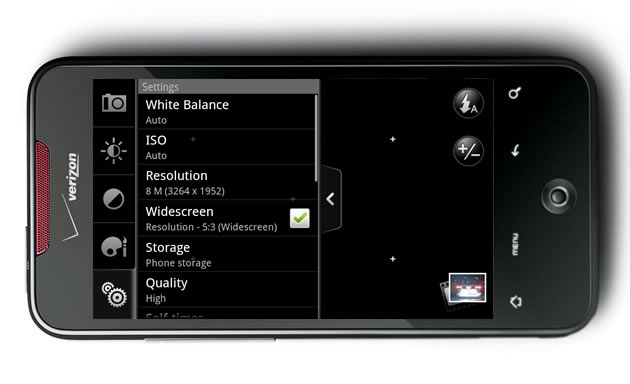
Most Android devices have exposure control settings. Users can control variables like contrast, exposure compensation, ISO, white balance, and more. Playing with these settings can help you to get better results before you apply Instagram’s filters. Let’s run through this quickly:

  • Contrast: How much of a difference there is between the bright and dark areas. The more contrast, the greater a difference. It also greatly affects colors.
  • Exposure compensation: Telling the camera to make the overall exposure brighter or darker.
  • ISO: How sensitive the camera will be to light. It’s a good idea to usually just leave this in the Auto setting. However, if you’re taking photos of your dog, baby, or another squirmy subject that just won’t stay still, feel free to raise this up to ISO 800 or 1600.
  • White balance: This changes the overall color rendition of the image without making it look monochrome or Sepia. 

android camera settings
Getting a better image to begin with will mean that Instagram’s filters will also do a potentially better job and you’ll get a higher quality final result.
iPhone Users: Lock it up

iphone camera ae af lockThis is a popular technique many iOS power users love:

  • Touch the screen to focus on a subject; you’ll see the blue box show up when you tap, and then hold for a second. This will lock the focus and exposure.
  • Recompose the image, if need be.
  • If needed, also provide a bit of fill flash.

Sometimes, a flash can provide light that is too harsh. Try putting a tissue over the light so you don’t blow out all of the lovely natural colors on your sushi plate (just a hunch).

Get creative with Instagram’s arsenal

Photography, for artists, casual users, and just about everyone in-between is all about falling in love just a little bit every day with each picture we take. With that said, you can make your images better by experimenting with all that Instagram gives you. For example, some filters are more versatile than others, but there are certain ones that were meant for specific shades of light or that look best with their included borders.
filter options
Want to make your images look like they weren’t taken with a phone? Compose your scene so that it can possibly have some sense of depth, and then apply the tilt/shift filter accordingly.
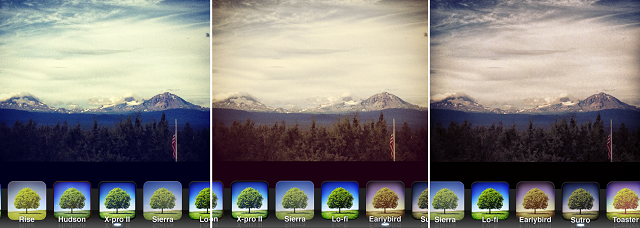

instagram tilt shift

Sayonara, screenshots

instragram screenshotIt happens to the best of us: Sometimes, we can’t help but share those hilarious text or Twitter exchanges with our dear Instagram followers. But adding that Walden filter to it is a bit unnecessary – meaning, don’t do it. This just isn’t the place to share those text-moments, head over to Twitter, Facebook, or Tumblr for that. And the moment is too good not to post to Instagram, it is also well worth #nofilter.

The personal touch

Go ahead and use some hashtags, just don’t make a habit out of listing every possible topic for a photo.  No more than two or three are ever really necessary – you don’t want to be that person (see if you can spot which of the examples below completely overuses hashtags while also failing to add a caption that sounds even remotely human). Also, be sure to act like a real person; interact with other users genuinely, like you would in real life, and don’t pretend to be something you’re not (it’s okay to just take pictures of your cat or your food, just don’t wax philosophically in the comments about your artistic eye). 
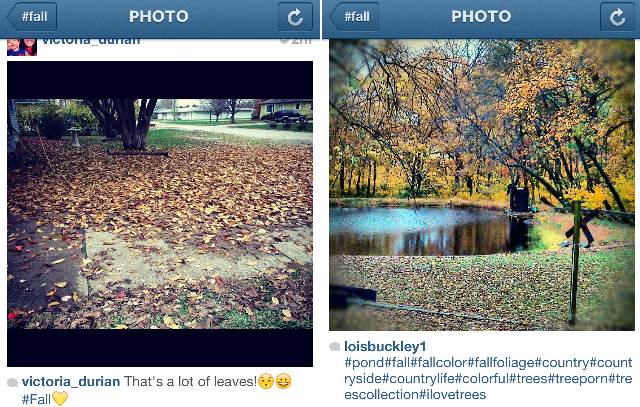
hashtag examples


Source : http://www.digitaltrends.com/mobile/tips-for-better-instagrams/
Wednesday, October 17, 2012

Lazy NYC restaurant wants you to help create its menu with Instagram

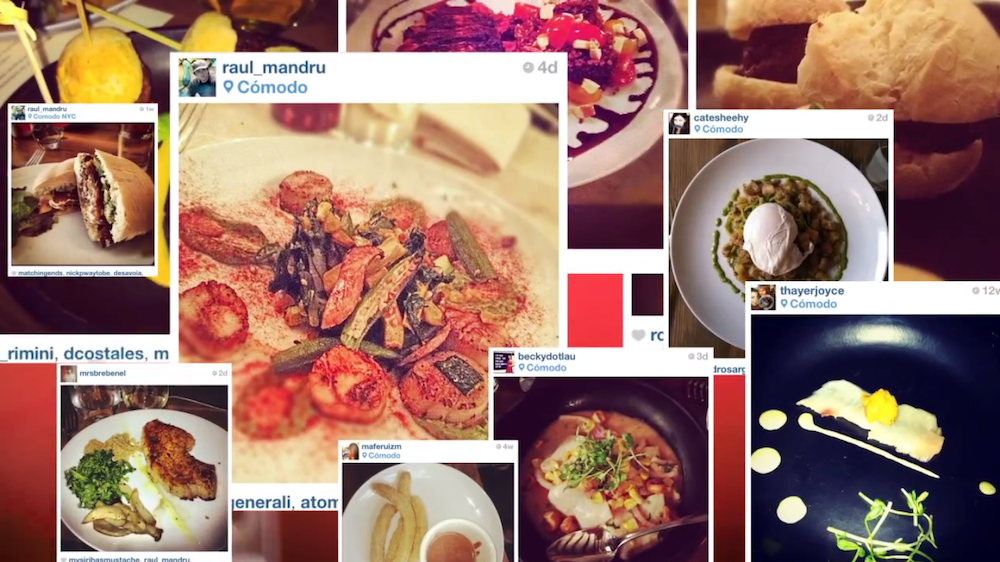
ComodoMenu Instagram

A downtown New York restaurant is asking patrons to upload photos of their meals to Instagram to help craft a visual menu for undecided diners and those interested in trying out the establishment. The inventive idea is fun and interactive, but it's hard for us to encourage people to keep taking photos of their food and uploading it to the Web.

Full disclosure: My family owns a restaurant in New York City and the cost of designing, printing, and distributing menus are a lot more than just clicking a few things on the Internet and waiting for things to ship. You have to pick a design that is functional, beautiful, representative of your facility, and most importantly, inviting. Then, it’s just a matter of hoping new customers are curious and kind enough to stop by, and luring them to come back for a delicious experience. So when I heard that a new Latin American restaurant opened up and is crowdsourcing its patrons to make its menu for them, I can’t tell if this is sheer cost-cutting laziness or pure genius.

Comodo, located in the SoHo neighborhood of downtown New York, came up with the idea when it noticed the food porn Instagram trends amongst its customers. You’ve likely seen this happen: People come in, get excited by the food they’ve ordered, and take artsy shots of the plate so their Instagram followers can be presumably jealous by what these guys are having for dinner. Comodo also realized this was a good way for the public to get a relatively accurate representation of the restaurant, so it start encouraging patrons to continue doing what they’re doing, then adding the hashtag #ComodoMenu to the photos.

The result? Ideally, a list of menu items, the names, what they look like, and the price. This is helpful for people considering trying the restaurant, but wants to know the price points, portion sizes, and an exact visual of what they should expect. Of course, this isn’t the only source of menu for Comodo; the restaurant has real physical ones as well for those who aren’t on Instagram.

So far, the hashtag and three-week-old restaurant has garnered 49 photos, but unfortunately, not all the photos are food from the restaurant, and most people forget to mention what the dish is called or how much it costs. Still, the idea is inventive and interactive, and it’s a cheap and easy way to create social buzz. The photos also help to show what menu items are popular judging by how often they show up under the hashtag, and can then be referred to as one of the recommended dishes at Comodo.

At the same time, us Digital Trends writers aren’t particularly thrilled with the whole food porn trend, so we’re pretty torn on encouraging other restaurants to follow suit. Hey, at least if you’re gonna do it, do it with a purpose and help a local business along the way. And businesses, if you’re gonna hop on the trend, you might want to provide some incentives for the patrons giving you free publicity! If it’s anything we can help promote, it’s symbiosis.


Source : http://www.digitaltrends.com/mobile/nyc-restaurant-instagram-menu/

Tuesday, October 16, 2012

Path update lets existing users fill their page with Facebook, Foursquare, Instagram data

facebook path

Path's iOS 6 update will allow existing users to add their Facebook, Instagram, and Foursquare activities to their log.

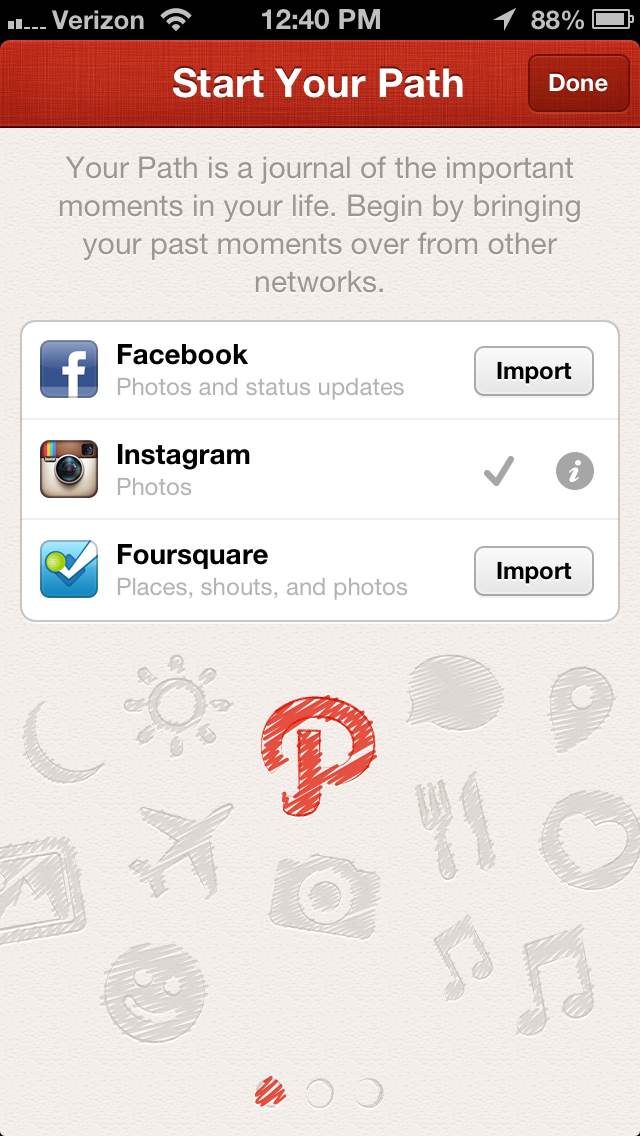
Up until now, Path users who wanted to fill their accounts with Facebook, Instagram, and Foursquare data could only do so when they signed up for a new account. The most recent update now allows existing users to import data from the three major social networks so you don’t have to start over if you really want to link all the accounts together.

What the iOS 6 update does is essentially allow you to pretend to make a new account, giving you the option to “Start Your Path” all over again and access the Import button for the three services under the Settings page. After the import, depending on the size of the data which you are syncing over to Path, it could take several minutes for your account to list all the moments from the three services you just hooked up.

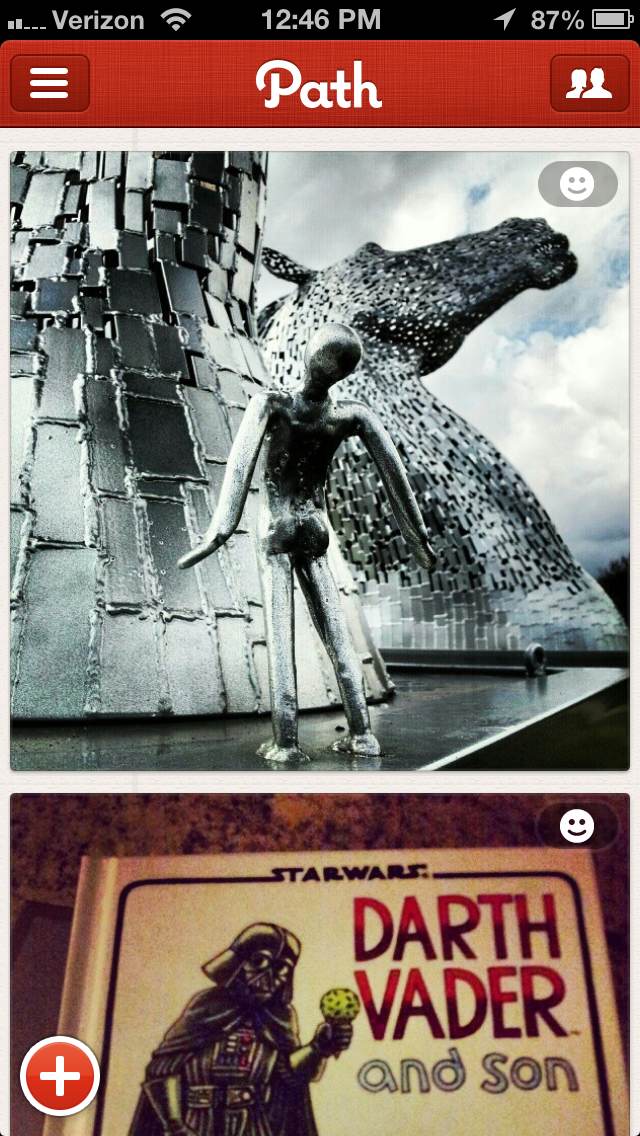
While the update is helpful to Path users, this sync will inevitably clutter most users’ home feed, logging in every single action from the three big social networks. Luckily, if you’re like most people and only have a limited amount of friends left on Path, this journal won’t look too bad. But if you have plenty of friends who are constantly updating the Path logs, prepare to scroll an incredible amount just to get through a day’s worth of activities. Each log for an Instagram photo already takes up a good amount of display real estate, fitting about a photo and a half per screen. And yes, this is on the iPhone 5′s enlarged screen. 

Either way, it’s to Path’s credit to allow users the option to make that choice if they want to, and the import integration will be useful to existing users who want to remain on the app and make it as content-filled as humanly possible.


Source : http://www.digitaltrends.com/mobile/path-update-lets-existing-users-fill-their-page-with-facebook-foursquare-instagram-data/

Wednesday, September 26, 2012

Instagram evidently phasing out live filters with iOS 6 update

Instagram iOS update no live filter

The update for Instagram on iOS 6 is here, and while it fixes the resolution issue, you'll notice one big feature missing: Live filters.

Those who have purchased the iPhone 5 may have already noticed that several apps that have not received their iOS 6 updates are often cut off in display, leave a large chunk of black blocks to fill in the shorter display of the iPhone 4. Instagram finally fixed this issue with its iOS 6 update, but that’s not the only thing users noticed. Sorely missing is the live filter feature, which allowed iPhoneographers to apply an overlay of their intended filter in live camera view before snapping a photo. If you’re one of the Instagrammers who frequent this functionality, tough luck. Instagram has updated its “known issues” section of the Help Center to reflect the following message:

“As of the current release (v3.1), Instagram does not support live filters on the iPhone 5. Going forward, live filters will be phased out as we work to improve the Instagram experience for all users.”

We’re not sure how exactly removing live filters is an improvement, considering this added functionality was one of the bigger focus of past Instagram updates for iOS. For fans of live filters, this will also prove to be a dilemma for whether or not they should update the app. On one hand, you can only avoid the update for so long, and the black bars that cut off on iPhone 5′s screen continues to be awkward without the update. On the other, updating means you might lose a feature you’ve come to use more commonly. Could you possibly stand to not see the world in Instagram filter after all?

Who knows, perhaps phasing out live filters is for the best. After all, my Android version of Instagram crashes often enough even without live filters so the company definitely has bigger issues at hand that might require the removal of this functionality overall — across all platforms — to make the app less buggy.

Image credit: The Next Web


Source : http://www.digitaltrends.com/mobile/instagram-evidently-phasing-out-live-filters-with-ios-6-update/

Saturday, September 22, 2012

See which tech companies are profitable with ‘How Do They Make Money?’

How Do They Make Money

How Do They Make Money shows you which popular tech companies are profitable and how they earn it.

Because of huge acquisitions like Facebook’s billion dollar purchase of Instagram, it’s easy to assume all tech companies are making a ton of cash. And so it may bewilder you to find out many popular web-based services are not turning a profit. There are also many online services that are earning money — some we did not expect at all — but we’ll get to that later.

If tech industry funding is something that interests you, How Do They Make Money can answer quite a few questions for you. The site lists a large number of different companies like Facebook, Tumblr, Pandora, and Netflix. When you click on one, a window pops up containing funding information. On the left-hand side it shows whether a web service is profitable or not and the information on the right gives examples of how it is funded. These money-making methods include things like advertising, subscribers, and selling data, among others. If one long list seems overwhelming, How Do They Make Money lets you filter choices by service or revenue type.

How does Tumblr make moneyFor instance, Dropbox is listed as “profitable” by offering paid subscriptions and freemium content. Instagram is apparently not profitable, but the following clarification is included: “Before selling to Facebook they were not making money.”

Spotify is not profitable either, despite offering advertising and paid subscriptions as part of its service. Competitor, Rdio, is also listed as not profitable. It’s extremely odd considering Instapaper is allegedly profitable through advertising and subscriptions. If an offline reading application, which has many free alternatives, can turn a profit then why can’t a music streaming service? 

One drawback to the site — and it’s a pretty big one — is that it doesn’t provide sources for the financial information listed. Actual earning numbers are omitted as well, only giving a thumbs up or down to indicate profitability but never listing how much money is brought in. This makes it difficult to take anything on the site without a considerable amount of salt. Unfortunately, if you’re after cold, hard facts and solid numbers then you’ll need to look elsewhere.

But despite the lack of transparency with its data, How Do They Make Money is still worth checking out. It certainly made us look at the free services we use in a different light. It’s unbelievable so much hard work and dedication can go into a product that may never make a dime. 

Did any companies on the list surprise you? Maybe we were shocked by the same ones!


Source : http://www.digitaltrends.com/mobile/which-tech-companies-profit-how-do-they-make-money/

Monday, September 17, 2012

Google snaps up Instagram-rival Snapseed to boost Google+

Google snaps up Instagram-rival Snapseed to boost Google+
Google+ now has its own Instagram-like plaything

Google has picked-up its own photo-sharing app to rival Facebook's purchase of Instagram, by acquiring the German photography software company Nik.

Nik developed the Snapseed application for iOS devices, which was the iPad App of the Year in 2011 and grabbed nine million users in its first year.

The application costs $4.99 from the App Store and it is thought that an Android version of the software is in the works too. You'd imagine that process may be sped up a little now.

The app garnered huge popularity thanks largely to its multi-touch enabled editing capabilities, but Nik also boasts a range of photography software which is now also under Google's control.

Joining Google+

The Snapseed team will relocate to the Mountain View HQ to join the Google+ team, so Google's intentions are pretty clear on this one.

"We want to help our users create photos they absolutely love, and in our experience Nik does this better than anyone," said Google+ boss Vic Guntora.

In a statement on the Nik website, the company said: "We are pleased to announce that Google has acquired Nik Software. For nearly 17 years, we've been guided by our motto, "photography first", as we worked to build world class digital image editing tools.

"We've always aspired to share our passion for photography with everyone, and with Google's support we hope to be able to help many millions more people create awesome pictures."


Source : http://www.techradar.com/news/software/applications/google-snaps-up-instagram-rival-snapseed-to-boost-google-1098010

Thursday, September 13, 2012

Instagram updates mobile website: Are full profiles next?

instagram desktop app

Instagram has rolled out a new design to its mobile website to more closely match its full site's design, adding hope to the rumor that profile updates are next in line.

With the Instagram and Facebook deal finally approved by the Federal Trade Commission, Instagram has unveiled its latest update to its platform. Instagram’s mobile website will now sport a new look and feel that closely reflects what you’d find when viewing photos on Instagram from your desktop browser.

instagram mobile page update

Before this update, users have not been able to interact with the mobile pages on Instagram. But this update changes all that. The “Like” and comment buttons are now larger, making them easier to use. And at the top right hand corner of Instagram’s mobile pages, you’ll find an “Open in App” button which will open the same Instagram page that you’re currently browsing within the native app on your smartphone.

More importantly, it also provides more evidence to the rumor that Instagram has its sights set on porting the functionalities you’d find on its mobile app to the Web.

In June, Instagram silently rolled out a new update to user Web profiles incorporated interactive buttons for liking and commenting on photos. To its user’s disappointment, that update had not yet addressed the demand for a profile page and discovery features, despite the existence of such features on the mobile app.

But that could all change in the near future as the company is now officially a part of Facebook.

In July, web designer, Cole Reinke, noticed a curious feature when logged into his account on Instagram.com. Typically users signed into Instagram’s browser app can only edit their profile information, but Reinke’s account had a non-functional “View Profile” button that disappeared as quickly as it surfaced.

If it’s true that that Instagram was testing out a profile page for the Web, we’re hoping that the complete transition of converting Instagram’s native app to the Web will come in the next update, now that its mobile and desktop pages are now cohesive. 


Source : http://www.digitaltrends.com/mobile/instagram-mobile-website-update/

Monday, September 10, 2012

Instagram is officially coming to Windows Phone

nokia instagram iphone app in windows phone

Instagram has confirmed that it will make its Windows Phone debut in the Windows Marketplace later this year.

The number of apps available in Microsoft’s Windows Phone Marketplace dwarfs the number of apps available on the Apple App Store and Google Play. But soon, those of you who took a risk with a Windows phone won’t have to fret that the world’s favorite photo app isn’t available: Instagram is coming to Windows Phones.

The Verge was initially tipped off about the app’s existence when a reader thought he noticed Instagram featured in the Nokia promo video featuring its PureMotion technology. This wouldn’t be the first time Nokia inadvertently unveiled a big new app in a promo video; Nokia’s promo video demonstrating a Lumia charging on a wireless charging dock “accidentally” unveiled Skype’s Windows Phone app in action.

We re-watched the video and could make out what might be the Instagram app during the PureMotion demo, but we couldn’t be sure. The tile in question is displayed toward the end of the promo clip and displays the words “Walk Up,” and is accompanied by a comment and “Like” button that’s uncanny to the silhouette of the talk balloon and heart button that you would find on Instagram. But a secondary explanation could be that the app is actually Vimeo.

Whatever the case may be, The Verge has confirmed that Instagram will be making its way onto Windows Phones.

ZDNet theorized that Facebook’s purchase of Instagram would result in the app coming to Windows Phones, and it looks like they were right. Facebook has a tight-knit relationship with Microsoft, which purchased a stake in Facebook back in 2007. Further, the Federal Trade Commission finally approved the Instagram and Facebook deal after conducting an investigation due to antitrust concerns. Had the deal been blocked by the FTC, Instagram would have walked away with $200 million from Facebook for its troubles.

A consumer’s decision on purchasing a smartphone these days has a lot to do with what the complimenting app store has to offer. Microsoft’s Marketplace has cracked the 100,000 app mark, while Apple has broken 700,000 apps. The Google Play store is hot on Apple’s tail with more than 500,000 apps. That said, the number of apps isn’t everything; a large number of apps go unused simply by getting lost in the mix. In other words, it’s a matter of quality over quantity — how many of the main app titles an app store can get from existing popular apps like Skype, Instagram, and Angry Birds. Of course getting apps like Skype, Instagram, and even Angry Birds onto the Marketplace came courtesy of existing Microsoft relationships. 

Windows Phone users — are you excited for Instagram? Let us know your thoughts in the comments.


Source : http://www.digitaltrends.com/mobile/instagram-on-windows-phone/