


The amount of malware targeting Android is still growing fast, and Google has promised to crack down. Turns out, that's not going so well.
Back in February of this year, Google announced it was hardening its stance on Android security, unveiling an app-scanner (codenamed Bouncer) to weed out malware uploaded to Android Market (now Google Play) through automatic scanning. Since then, Google has taken more steps to protect Android users: it acquired VirusTotal back in September and in Android 4.2 Jelly Bean introduced an optional app verification feature that enables users to identify dangerous and potentially-dangerous apps on their devices, even if they downloaded them from the Web or got them from an app store other than Google Play.
How have Google’s efforts to combat Android malware been working out? Perhaps not so well. Security researchers were quickly able to analyze how Bouncer operated and find easy ways to circumvent Google Play’s automated scanning — techniques publicly available now to malware authors if they hadn’t managed to think of them on their own. Further, Xuxian Jiang of North Carolina State University has published an assessment of Jelly Bean’s app verification capability. The results? Google’s app verification service identified just over 15 percent of malware samples thrown at it from the Android Malware Genome Project
What do these findings mean? Do Android users need to immediately run out and install antivirus and security software on their devices? Or do only people who engage in “risky” behavior with their phones or tablets need to be worried?
How bad is it?

Looking at raw numbers, it’s pretty easy to Android malware is a serious problem. According to security firm TrustGo (PDF infographic) concluded in October that malware and viruses targeting Android had increased 580 percent year-on-year. Back in February, Juniper Networks reported an even scarier number: a 3,325 percent increase in malware targeting Android. (They made a keen little infographic too.)
Are these signs of Android Armageddon? Not exactly — or, at least, not yet. Those figures include not just apps found on Google’s own app store in Google Play, but also apps available for download out in the wilder-and-woolier world of third party app marketplaces. While Apple’s iOS (and now Microsoft’s Windows RT) operate in a walled garden where the parent companies are the only source for applications (unless owners jailbreak their devices), Google’s more-open Android platform actually encourages third party marketplaces. Probably the best-known (and best run) is Amazon’a Appstore, but there are hundreds of other Android marketplaces around the world. Many of these provide a localized experience for users: after all, if you don’t speak English, Google Play can be a daunting experience. This is particularly true in China, where not only do Chinese-language app marketplaces abound, but Google Play itself offers no paid apps due to Google’s very limited presence in the Chinese market. Android users in China who want premium apps are almost certainly going to go to third party marketplaces. Some of them are managed responsibly and proactively…others, not so much.
Even the comparatively sanitized world of Google Play isn’t entirely safe. In it’s October report, TrustGo found there were 175 million downloads of “high risk” apps from the Top 500 apps in Google Play alone. For TrustGo, high risk apps are separate from outright “malicious” apps: where malicious apps outright try to harm users or their devices, high risk apps are things that can potentially compromise a user’s privacy, steal data, make fraudulent transactions, track usage and location, etc. In many cases, high risk apps are programs that are attempting to monetize themselves using insecure ad networks: that means data like phone numbers and device IDs are being sold (or snooped) by third parties, meaning users get targeted with more spam, malware, and even telemarketing calls. Other high risk apps do things like replace the browser home page with their own search page, add their own icons to users home screens, and more.
How’s Google doing?
For well over a year, Google has been taking serious steps to try to reduce malware in Google Play, and the new app verification feature in Jelly Bean is intended to give users a way to confirm whether an app is legit regardless of whether they get it from Google Play or from other sources.
But so far, Google efforts don’t seem to have made a tremendous difference. Worse, the new app verification feature could lead Android users to have a false sense of security about their apps.
Bouncer — Google conducts automated scans of apps uploaded to Google Play (and developer accounts) using Bouncer, flagging those found to contain known malware. Bouncer works by essentially loading up Android apps in a software emulator using Google’s cloud infrastructure: basically, the app thinks its running on an Android device, but it’s really just running inside a program that behaves like an Android device. Google lets the app do its thing for a few minutes, watching its behavior, and if it doesn’t see anything suspicious, gives the app a pass. Back when Google unveiled Bouncer in February, the company claimed it had already been running quietly for some time and was responsible for a 40 percent drop in the number of possibly-dangerous programs available on Google Play.
Sounds great, right? Security researchers were quickly able to ferret out a lot of interesting behaviors of Bouncer — many of which could be used to let malware slip through its fingers. For instance, Bouncer’s analysis is purely dynamic: it only flags apps that misbehave during the five-or-so minutes Google runs the app in the emulator. If an app is subtle and just waits for a while before engaging in risky behavior, it could get a pass. Similarly, Bouncer seems to use a very limited set of contacts, pictures, and other fake personal information, making it easy for malware authors to special-case those items and avoid trying to steal them. Bouncer does let the apps it’s testing connect out to the Internet; however, those connections all come from IP ranges easily identified as Google, making it simple for malware developers to let remote Web services behave differently for Bouncer than they would for an Android device in the wild. Google has been updating Bouncer to work around some of these issues, but the fact remains that malware that delays its attacks long enough to evade Bouncer’s scrutiny will probably still pass muster. Similarly, apps that have totally innocuous installers but then download malware via update mechanisms can bypass Bouncer entirely.
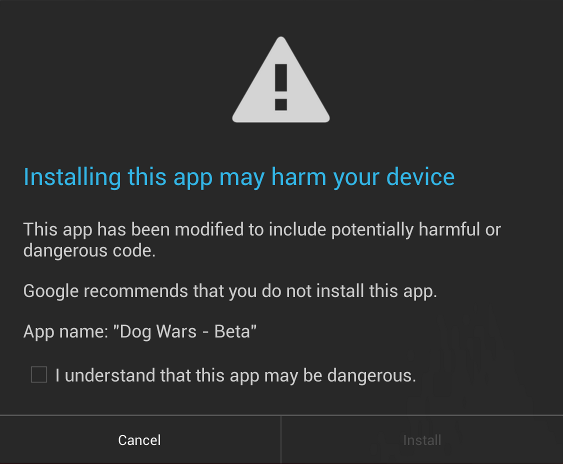
App Verification — Android 4.2 Jelly Bean includes an app verification service as part of the Google Play app. The service can be used with apps obtained from any source, but users must have Google Play installed. Once app verification is activated (in Settings > Security > Verify apps) the service sends information to Google, including the app’s name, URL, and a probably-unique signature string (a checksum) representing a scan of the app’s files. Google then compares that information to data in its records about known malware apps: if there’s a problem, Android will alert users the app is either “dangerous” or “potentially dangerous:” potentially dangerous apps present a warning, and users can choose whether or not to proceed with the installation. Dangerous apps are blocked outright.
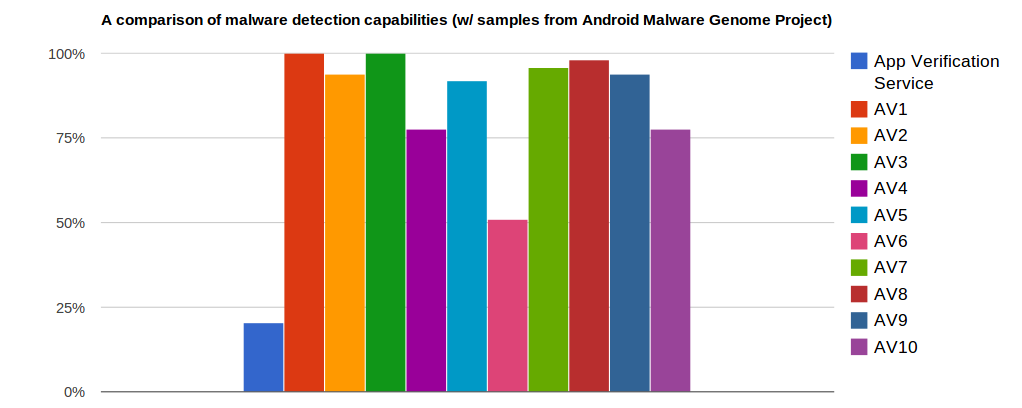
This sounds like another positive step for Android security, right? It could be, but so far that doesn’t seem to be the case. North Carolina University’s Xuxian Jiang threw some 1,260 samples of Android malware (representing 49 different “families”) from the Android Malware Genome Project at Google’s App verification service to see how it did. The result? App verification detected just 193 of them, or a bit over 15 percent of the total. Right now, it appears that Android users relying on Jelly Bean’s app verification to ensure their safety may mainly be receiving a false sense of security.
Google’s app verification will likely improve significantly in time. In September, Google acquired security software developer VirusTotal for an undisclosed amount, and VirusTotal’s technology has apparently not yet been integrated into Google’s app verification. When Jiang randomly chose one example from each of those 49 Android malware families, Google’s app verification service flagged 10 of them, but ten representative antivirus services in VirusTotal flagged anywhere from 29 to 49 (yup, 100 percent) of the samples.
Even if (when?) Google integrates VirusTotal technology into its app verification service, it will always be playing catch-up to malware authors, though. Even now, Android malware developers are known to mutate and repackage their malware so it can have different checksum values and thus avoid detection. Google’s app verification service also does no on-board scanning or analysis of app behavior. If an app doesn’t get flagged right away, it’s never going to get flagged later.
Protect yourself
To be sure, the scale of the Android malware problem has nowhere near the scale of, say, the Windows malware problem. TrustGo tallied up nearly 29,000 different Android malware samples in September 2012 — compare that figure to the over 75 million unique malware signatures firms like McAfee are tracking for Windows. Windows’ total installed base is larger than Android, and while Android is catching up fast it’s still a relatively young platform without the sheer volume of malware targeting something like Windows. Put another way: TrustGo emphasized that 175 million high risk apps had been downloaded from Google’s Top 500 apps in October 2012; however, when The Next Web’s Emil Protalinski concluded just 23 of those 500 were problematic.
How can users protect themselves?
Stay up to date — The best way to make sure you have the most secure version of Android is to apply operating system updates as soon as you can. Unfortunately, the fragmentation of the Android platform makes this impossible for many users, since mobile carriers have been very slow to roll out patches and fixes. More frustrating, some manufacturers stop offering updates for their devices long before their useful lifespans are over, meaning the only way for many customers to get newer, more-secure versions of Android is to get a new device.
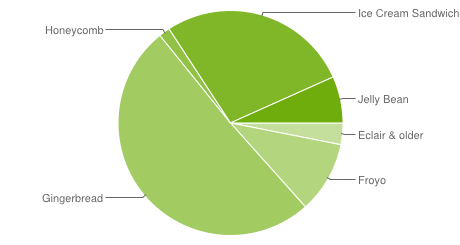
How bad is it? Back in September data collected via Duo Security X-Ray mobile app estimated over half of all Android devices carried known, unpatched security vulnerabilities. Also consider that, according to Google, Android version 2.3 (Gingerbread) still accounted for about half of all Android devices checking in with Google Play as of last week.
Don’t download apps from links or messages — Limit your apps downloads to reputable, well-managed app stores. Although there’s no guarantee apps in Google Play, the Amazon Appstore, or other above-board ventures are safe — and, as we saw above, popularity is no guarantee of safety — well-managed stores are less likely to be serving up malware than apps available via direct download. Remember: one way scammer and cybercriminals get people to install malware is by sending links via email or text messaging — it’s particularly effective with children and folks who aren’t technically savvy.
Read those permissions warnings! — When you install an app from Google Play, you’ll be asked whether you want to grant it permission to sense SMS or MMS messages, access browser history or bookmarks, or access your contact data. Think careful about those permissions. Does that casual game need to send text messages? Why does that free disco-party flashlight app need to access your browsing history? If it doesn’t make sense, don’t grant the permissions.
Consider security software — For everyday Android users, common sense and paying attention should be enough to keep devices (and their data) reasonably safe — for now, anyway. However, for less knowledgable or technically-inclined users — perhaps like children and senior citizens — Android security software from a reputable vendor might be worth considering. Many security developers offer Android packages and services, including Avast, TrendMicro, Symantec, BitDefender, ClamAV, F-Secure, Kingsoft, Kaspersky, Kingsoft, and others.
Right now, security software might be more important for businesses and enterprise, particularly as users increasingly bring their own smartphones and tablets to the workplace. Although the most profitable Android malware right now seems to be SMS scams (that surreptitiously send SMS messages to a service that charges a mobile user’s bill), 2012 was also the first time security researchers found mobile botnets, and targeted mobile attacks are on the rise, where attackers use Android (and BlackBerry) malware to move funds out of personal and business bank accounts.
Bottom line
The Android platform isn’t stumbling under the weight of malware, but mobile threats are very real and growing — and, as the most-exploitable and most-popular mobile platform, Android is cybercriminals’ biggest target. Google is taking steps to make Google Play and Android devices more secure, but so far those efforts don’t seem to be having big payoffs for users and, in the case of the app verification feature in Google Play for Jelly Bean, may lull users into a false sense of complacency. We hope Google’s security efforts improve quickly; in the meantime, the best way for Android users to stay safe is to be informed and vigilant.
Source : http://www.digitaltrends.com/mobile/who-can-fight-android-malware-not-google/


