Showing posts with label hands. Show all posts

Tuesday, November 20, 2012

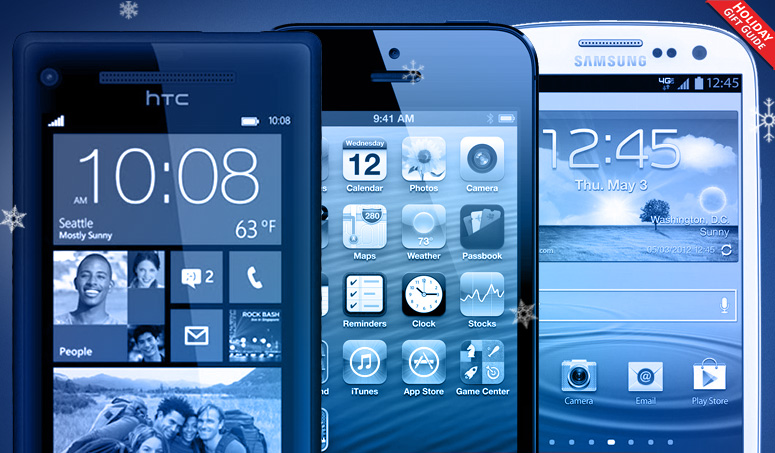
Smartphone holiday gift guide

Smartphone holiday gift guide

It's that time of year. All of the new devices are hitting shelves in hopes of making it under a Christmas tree and into your hands. From the iPhone to the Razr M, check out our favorite phones this holiday season.

2012 Holiday Gift Guide

The last three months of the year are always packed with new smartphone releases. It’s when manufacturers roll out the biggest and best devices they’ve got (and we put the emphasis squarely on “biggest” this year) and people like you and I groan that our wireless contracts ended in the summer. For the last couple years, we’ve been able to point to a couple devices that are “must haves” and stand above the crowd, but this year is different. For the first time, nearly every major phone manufacturer – Apple, HTC, LG, Motorola, and Samsung – have a flagship phone worth talking about, and every major operating system – Android, iOS, and Windows Phone – is accounted for. In fact, there are a number of great devices we haven’t included here. Unless you’re hoping to get a free phone, it’s almost hard to go wrong this holiday season. 

And so, without further adieu, here is our smartphone gift guide for the 2012 holidays.

galaxy s3

Samsung Galaxy S3, $200 w/2-yr contract

AT&T, Sprint, T-Mobile, Verizon, U.S. Cellular, Ting

For five years, the iPhone has been the undisputed champion of the smartphone game. Phones like the Motorola Droid and HTC EVO have come and gone, but with the Galaxy S3, Samsung took its game to a new level. The S3 is the first phone to rival the iPhone in sales and buzz. After nearly half a year on the market, the S3 is still one of the top phones to have.

We still wouldn’t say that the design and user interface of the Galaxy S3 are able to match the fluidity of the iPhone 5, but Samsung’s phone has many technical advantages over the new iPhone 5, including near-field communication sharing, a larger screen, expandable memory, better maps (Google Maps), a removable (replaceable) battery, and Android itself, which boasts some technical prowess over Apple’s OS in the area of communication and notifications.

Whether you’re a die-hard iPhone user, a renewer, or someone new to smartphones, we recommend you check out Samsung’s smartphone this holiday season.

iPhone 5

Apple iPhone 5, $200 w/2-yr contract

AT&T, Sprint, Verizon

It’s the new iPhone. What more is there to say? Actually, a lot. With the iPhone 5, Apple has taken its hardware design to a new level, outputting one of the thinnest, most durable smartphones on the market. It will take a ding, but in a number of drop tests against the Galaxy S3 and other rivals, the iPhone survived longer. The phone also sports a slightly longer 4-inch screen and an upgraded version of iOS (6.0.2). The overall design of iOS is beginning to look aged, but for smartphone users who just want things to work and don’t want to worry about managing things like background processes, the iPhone is still the champ.

This is the smartphone both you and your parents might use. With a heap of competent rivals hitting the market, the iPhone is losing its place as the supreme leader of all smartphones, but that doesn’t mean much. The iPhone is still arguably the best smartphone choice for the widest variety of users. If you’re debating between this and the GS3, check out our in-depth iPhone 5 vs. Galaxy S3 comparison.

HTC Windows Phone 8X

HTC Windows Phone 8X, $200 w/2-yr contract

AT&T, T-Mobile, Verizon

The Galaxy S3 was the first non-iPhone smartphone to go multi-carrier, but it wasn’t the last. With the 8X, HTC has delivered the first flagship Windows Phone 8 device. If you are up for renewal and happen to use AT&T, T-Mobile, or Verizon (sorry Sprint subscribers), you should check out the 8X. We’ve been recommending you try out Windows Phone for years, but this time, we mean it. Microsoft’s mobile OS has a different look and feel to it than Android or iPhone, and with an upgraded homescreen that allows Live Tiles (widgets/icons) of different sizes and shapes, Windows Phone 8 is finally displaying the flexibility it promised when it debuted two years ago. There are a few big apps still missing from Microsoft’s app store, but most people should have few problems adapting to the world of Windows Phone, especially if you like music and podcasts. Windows Phone has decent built-in solutions for both.

LG Optimus G

LG Optimus G / Nexus 4, $200 w/2-yr contract

AT&T, Sprint, T-Mobile (Nexus 4), Unlocked (Nexus 4)

LG was (and still is) one of the biggest names in basic phones (flip phones), but the transition to smartphones has been rough. However, with the Optimus G, LG has finally taken a strong step toward regaining its image, and maybe some market share. The G is one of the best smartphones on the market. And though LG wasn’t able to blanket the market with the G, it has done everything in it could to make the phone available, in some form, to almost everyone. Sprint owners can enjoy the Optimus G that we love most, with its refined design and detailed edging; AT&T users get the same basic phone, though made to blend in with the carrier’s phone lineup; and anyone on T-Mobile can purchase the Google Nexus 4, which may not bear the LG name, but is most definitely an Optimus G on the inside. The only downside of the Nexus 4 is its lack of 4G LTE connectivity, though that shouldn’t bother T-Mobile users.

We recommend you buy the Nexus 4 through the Google Play Store. There, you can pick it up for $300 with no contract. To give you an idea of how good a deal that is, most smartphones retail for $600 – $700 unless you lock yourself into a two-year contract with a carrier.

Motorola Photon Q

Motorola Photon Q, $200 w/2-yr contract

Sprint

Fans of physical keyboards, we feel your pain. Even fewer top phones come with a QWERTY slide-out keyboard than a year ago, and a year from now, we can’t guarantee there will be any at all. But for now, you can cling tight to the Photon Q. Sadly, the Q is only available on Sprint, but if you love keyboards, it’s worth the jump. The Q runs a relatively clean version of Android 4.0, is incredibly comfortable to hold, and has the same 5-row QWERTY keyboard that made the Droid 4 one of our favorite Verizon phones last year. The only downside to the Q is its battery life. If you happen to be in an area served by Sprint 4G LTE, that’s another good reason to consider the Q. Did we mention that each key on the phone is individually backlit? Yep.

Samsung Galaxy Note 2Samsung Galaxy Note 2, $300+ w/2-yr contract

AT&T, Sprint, T-Mobile, Verizon, U.S. Cellular

I stand by my review of the first Galaxy Note. To me, the Galaxy Note and Note 2 are just too large to make for effective phones. But the people have spoken, and big is in. Due to strong sales of the original, the Galaxy Note 2 is available on almost every major carrier, but it will cost you at least $300 with a two-year contract, making the Note 2 one of the most expensive devices on the market this year. If you really want a 5.3-inch super screen, crave a pop-out stylus, and really want to block half of your face when you make a phone call, the Galaxy Note 2 is the device for you. Outside of its size, this is a solid phone, with most of the benefits of the Galaxy S3 with Android 4.1 (Jelly Bean) to boot. Our advice: hold an iPhone, then hold a Galaxy S3, then pick up the Galaxy Note 2. Whichever one fits your hands best, go for it.

Motorola Photon Q

Motorola Droid Razr M, $100 w/2-yr contract

Verizon

We have nothing bad to say about the Droid Razr HD and Razr Maxx HD. They are both great Verizon handsets (though the Maxx is your best bet due to battery life). So why the Razr M? We feel it might be the best-sized and most comfortable phone on the market. In a market dominated by phones made for giant hands, the Razr M, like the iPhone 5, is sized for all. Though it has roughly the same dimensions as Apple’s new iPhone, the Razr M packs in a more spacious 4.3-inch screen, which is just wide enough that you won’t continuously mistype all of your emails and texts (sorry iPhoners, you know it to be true). The placement of key buttons like the volume and power are also better than the iPhone. If you’re hesitant to move toward the giant 4.7- to 5-inch smartphone range, then the Razr M is a solid choice.


Source : http://www.digitaltrends.com/mobile/smartphone-holiday-gift-guide/

Wednesday, November 14, 2012

Samsung remains steadfast as it vows to continue legal battle with Apple

Samsung will not follow HTC's lead and come to a peaceful conclusion to its ongoing legal battle with Apple, vowing not to negotiate with the firm.

HTC and Apple shook hands earlier this week, having decided to put all their patent disputes behind them, and get on with building smartphones instead. This was good news for us, as it’s one less lawsuit to hear about, good news for HTC, as it avoids any costly court judgements and finally, good news for Apple as it will make money from each HTC Android phone sold.

Samsung however, will not be following HTC’s lead, and will instead continue to battle it out with Apple both in stores and in the courtroom. In an interview with Yonhap News in Korea, Samsung’s President of Telecoms and IT, Jong-Kyun Shin said “we don’t intend to negotiate at all” when asked if Samsung would settle any dispute in a similar way to HTC.

The various legal battles between Apple and Samsung have captured headlines throughout the year, particularly regarding Apple’s $1 billion win against the company, and Samsung’s controversial win in the UK. Shin’s comments indicate we’ll be seeing more of the same in the future.

HTC has signed a 10-year licensing contract with Apple, believed to include a payment of around $6 to $8 per HTC handset sold, which could total up to a figure of approximately $275 million per year, based on HTC’s current smartphone sales performance.

It’s an interesting turn of events too, as Apple has long been viewed as the aggressive one when it comes to litigation, but this shows Samsung is equally committed to continuing the patent war in a courtroom setting.

Samsung has filed an appeal against its $1 billion judgement, which is currently being assessed by the courts, while Apple has asked for more damages, saying Samsung has harmed the iPhone’s “distinctive product identity.” As Samsung won’t be signing an agreement with Apple anytime soon, expect more legal fireworks from the pair over the coming months.


Source : http://www.digitaltrends.com/mobile/samsung-vows-to-continue-legal-battle-with-apple/

Wednesday, November 7, 2012

Hands on: Grove iPhone 5 bamboo case adds a touch of handmade beauty

Grove iPhone 5 case

We get our hands on the Grove bamboo case for iPhone 5, an expensive, premium case. Is it worth the extra cash? Read on to find out.

So much for that early October shipment date Grove teased us back in September! But no complaints here; we finally got our hands on the latest handcrafted case for the iPhone 5 and it’s already gearing up to be one of the more unique cases available out there. But is it worth the $80 price tag? Here’s your first look at the finished product.

Look and feel

Based in Portland, Grove is known for creating handmade, organic products while maintaining a low carbon footprint – down to the recycled cardboard packaging. When we popped the case out of its wrapper, we immediately clamored on the quality feel and artfully designed structure. The Grove iPhone 5 bamboo case breaks into two pieces, a lower and upper component, so you can slide your phone within the case. The inside of the case has a nice padding to keep your phone’s metal back scratch-proof.

With the case on, the iPhone 5 gains about one-third inches in width, which makes it almost as wide as a Samsung Galaxy S3. The phone also gets an added weight that feels more secure, because the iPhone 5 is so strangely light that we thought it was going to fly off our hands if we’re not careful.

One thing we enjoy is the limited branding on the side of the case. We’ve seen phone cases with obnoxiously large logos slapped on the back, and it’s nice for Grove to monetize on being one of the premiere brands to use wood, and stick the little logo where it’s still seen but not in-your-face.

Utility

Although wood is certainly a sturdy material, small portions tend to make for a rather brittle phone case. Thankfully, with the padding inside Grove’s iPhone 5 case, the product is tough against scratches and light drops. But even the company admits the bamboo cases are not drop proof, and strong impact will damage the case. If you’re choosing to buy Grove’s case, you probably value look a bit more than protection, or want a happy compromise on both.

One cool design component is the bamboo Sleep/Wake button that sits right on top of the iPhone’s original placement. It’s a neat way to make your case look cohesive, while protecting the button from dust and grime. The wooden overlay is supremely responsive despite the extra width, which is always appreciated.

While the Grove bamboo case adds a stylish and rustic touch to your iPhone 5, it does come with small complications. For one, the two-component design makes it prone for the case to slip off when you pull the phone out of your skinny jeans (sorry for being so fashionable here, guys). Secondly, while the design does boast Lightning access, kiss goodbye to your 30-pin adapters. Those babies are blockaded entirely, so unless you already have a new speaker dock with Lightning pins, you’ll have to remove the case before attachment. Removing the case only takes three seconds, but shortcuts would have been nice.

Bottom Line

Again, at $80 (or $130 for graphical ones) apiece, the Grove iPhone 5 bamboo case is a luxury item targeted for those who don’t mind paying for uniqueness. If you have the cash, the case is a beautiful investment in a function-meets-fashion accessory – all while supporting a green cause. All Grove products are also handmade in the company’s own workshop, so remember take that into the pricing consideration.

Yes, there are issues with pieces sliding apart and Lightning-to-Thunderbolt adapters, but if these aren’t problems you see yourself facing then by all means, look into the Grove bamboo case. The product is available now, with shipment dates ranging between now to end-of-year if you order today.


Source : http://www.digitaltrends.com/mobile/hands-on-grove-iphone-5-bamboo-case-adds-a-touch-of-handmade-beauty/

Tuesday, October 30, 2012

Windows Phone 8 release date: when can I get my new phone?

Windows Phone 8 release date: when can I get my new phone?
Shut up and take my money!

With the announcement of the Windows Phone 8 prices, you'll be pleased to know you won't need to wait long to get your hands on one.

But with a plethora of phones on offer, and a number of networks promising to thrust them into your hands, how much will you need to fork out and how many days will your have to count down?

The HTC Windows Phone 8X UK release date has been set for 2 November, but the rest of the phones will be available on multiple networks and retailers later in the month it seems.

HTC Windows Phone 8X

The first Windows Phone 8 handset we've subjected to our intensive testing (see the HTC 8X review to get an idea what's going on) but is a slightly more expensive option thanks to the Beats Audio power and improved design.

If you want to get your hands on the phone, pre-orders are now open for the HTC 8X, with a release date of 2 November being touted from the likes of Phones 4U, Three and Carphone Warehouse.

Some networks are charging for the phone up front, but here's our guide to how much you'll need to pay and the cost each month:

  • Phones 4U: (No cost up front) £31 per month
  • Carphone Warehouse: No price as yet
  • EE: (£29) £36 per month
  • O2: (£29) £36
  • Vodafone: No price as yet
  • Three: (£30) £29

HTC Windows Phone 8S

The little brother to the flagship Windows Phone 8 handset is proving a hit with the networks, with most choosing to range the new device.

With it's amp-less innards and lower spec, it's certainly one of the cheaper choices on offer – but just how much will it cost you?

Read our hands on: HTC 8S review

  • Phones 4U: (No cost up front) £20.50 per month
  • Carphone Warehouse: No price as yet
  • EE: (No cost) £20.50
  • O2: (No cost) £21.50
  • Vodafone: No price as yet
  • Three: No price as yet

Nokia Lumia 920

Nokia Lumia 920

This is the phone that most people are excited about – and for good reason, given the huge plethora of technology on offer inside. Be it wireless charging, the ability to text with gloves on or the Puremotion HD+ screen, it's got a lot going for it.

However, here's the rub: it will be an exclusive to EE (thanks to being the only 4G Windows Phone 8 handset) and will therefore cost a boatload to own. Sad times.

Read our hands on: Nokia Lumia 920 review

  • Phones 4U: (£19.99 cost up front) £46 per month
  • EE: (£49) £36 per month

Nokia Lumia 820

The little brother to the Finns' big hitter, the Lumia 820 offers some similar features but skimps on a few specs to keep the cost down.

You'll be able to chuck on a range of cases (including the ability to wirelessly charge) and a more-than-half-decent camera to boot – great for those on a budget, although it's not the cheapest on offer by far.

Read our hands on: Nokia Lumia 820 review

  • Phones 4U: (No cost up front) £31 per month
  • Carphone Warehouse: No price as yet
  • EE: (No cost) £36 per month
  • O2: (No cost) £36 per month
  • Vodafone: No price as yet

Samsung Ativ S

The 'under the radar' member of the Windows Phone 8 clan (thanks to only just being shown off in any kind of shape to the prying eyes of us journalists) it's been dubbed the Windows Phone 8 Galaxy S3… and that's a pretty good mantle to have.

It's thin, light and comes with a whopping Super AMOLED screen… this could be the underground hit for Microsoft if ever there was one, despite the fact not many networks are stocking it (read: O2).

Read our hands on: Samsung Ativ S review

  • Phones 4U: (No cost up front) £36 per month
  • O2: (No cost) £36 per month

Source : http://www.techradar.com/news/phone-and-communications/mobile-phones/windows-phone-8-release-date-when-can-i-get-my-new-phone-1108436

Monday, October 29, 2012

Hands on: HTC Windows Phone 8S review

Hands on: HTC Windows Phone 8S review

Update: We had more hands-on time and got to dive into the OS at the Windows Phone 8 event in San Francisco – here are some further thoughts from U.S. Associate Reviews Editor Alex Roth.

HTC has doubled down on Windows Phone 8, creating two colorful handsets, the compact HTC Windows Phone 8S and the more powerful HTC Windows Phone 8X. Both devices are available in four colors that help them stand out from the smartphone pack, although consumers might confuse them with the also splashy Nokia Lumia 920.

We've already reviewed the HTC Windows Phone 8X and found it to be a slightly mixed bag that's more good than not. Now, at the Windows Phone 8 launch event in San Francisco, we took a hands-on look at the 8S, just weeks ahead of its rumored November release date.

HTC Windows Phone 8S review

Showing its colors

Other than perhaps those distinctive Windows 8 Live Tiles, the first thing you'll notice about the HTC Windows Phone 8S are those bold colors it's available in. Gray, black, red and blue are the four primary colors on offer.

HTC Windows Phone 8S review

Unlike the 8X, which comes in a single solid color, the 8S has a two-tone look. The bottom of the phone's face and the rear cover each sport a lighter hue. Red is met by orange and blue by a lighter blue. Black has a white stripe, giving it an Oreo cookie look, and gray with lime green, which comes of a bit like a crossing guard's vest.

Premium plastic

Holding the 8S, we were struck by its feel in more ways than one. Its polycarbonate construction has a distinctly rubbery feel. It's grippy and honestly fun to hold. There's an unmistakably plastic feel, but not the flimsiness you'd find with a budget phone.

HTC Windows Phone 8S review

That rubbery quality is a nice touch, but did have us worrying that it might pick up lint in our pocket and make the 8S lose some of its trademark luster.

The phone's Gorilla Glass face, rounded backside and highly tapered edges give it a sleek appearance. This makes the feel of its easy-to-hold rubberized body all the more surprising.

On the inside

The Windows Phone 8S by HTC has good specs for what will likely be a moderately priced device. While we don't have a firm word on costs yet, it will undoubtedly go for less than the 8X, which is $560 as a full priced, no contract device.

HTC Windows Phone 8S review

In the processor department it has a very standard 1GHz dual-core Snapdragon processor. The display is a rather sharp 4-inch, 720p screen. For memory there's 1GB of RAM and 4GB of onboard storage, with room for an additional 32GB via microSD expansion. That actually puts it above the 8X, which is stuck at 16GB of space thanks to its lack of expandable memory support.

All the right buttons

As with the 8X, the Windows Phone 8S's lock button is found on top of the phone. Depending on what sort of device you've grown accustom to, this placement may take some getting used to.

HTC Windows Phone 8S review

There's a volume rocker on the right side with the standard issue Windows Phone 8 dedicated camera button below it.

Pop-off panel

That two-tone space on the rear is actually a pop-off panel, allowing you access to a microSD slot. Again, the 8X lacks such a feature, and the 8S is only a tiny bit thicker for having a more open design. It's 0.41-inches (10.3-mm) thick, as opposed to 0.40-inches (10.1-mm).

HTC Windows Phone 8S review

This small, removable panel is easy to slide off thanks to the phone's rubberized build. While the lack of removable battery will disappoint some consumers (the cell is only 1700 mAh, after all), the miniature hatch design is yet another distinct design decision for the Windows Phone 8S.

HTC Windows Phone 8S review

The HTC touch

In addition to what Windows Phone 8 offers, HTC has contributed some software of its own. Its Live Tile behaves like an Android widget, displaying a forecast, temperature and the time at a glance.

HTC Windows Phone 8S review

Jumping into the app gives further information on those subjects as well as stocks.

HTC Windows Phone 8S

In settings you'll find Attentive Phone, which has a selection of intuitive ringer options. The Windows Phone 8S can be set to ring louder when tucked away in a pocket or purse, automatically quiet down or shut up altogether when you pick it up or turn it over.

HTC Windows Phone 8S

Taking pics

Like all devices running Windows Phone 8, HTC's 8S has a dedicated camera button. Pushing it opens up the 5-megapixel camera, which can also shoot 720p video.

HTC Windows Phone 8S

If you feel like slapping some Instagram-style post-production on your snaps, HTC has included its own Photo Enhancer app. It has a number of filters to choose from, including the all-popular vintage style.

Alas, this is not a phone for video chat fans as it lacks a front-facing camera.

Beats by Dre

The Windows Phone 8S has surprisingly good external speakers. We were able to crank pre-loaded tracks to a high a volume without getting distorted, crunchy sound. While any music aficionado would surely use headphones, a representative reminded us that these speakers benefit the speakerphone function as well.

HTC Windows Phone 8S review

As the familiar "B" logo suggests, there's Beats by Dre branding here, which likely plays into the strong audio output. However, the 8S does not boast the volume-boosting amplifiers of its big brother the 8X.

Early Verdict

If we had a to pick a favorite aspect of the Windows Phone 8S by HTC, it would have to been its overall look. Between the iPhone 5, Galaxy S3 and Droid Razr M, we live in a sea of polished aluminum. In the past, we've claimed to prefer its feel, but HTC's 8X and 8S have proven that a little aesthetic variety is indeed nice.

It's a compact phone that's still got reputable specs, and the option for microSD expansion is an unexpected plus, given the 8X's completely sealed design.

We do wonder what its battery life will be like with a 1700 mAh cell, and the lack of front-facing camera is rather strange. A special version of Skype has been one of Mictosoft's major bragging points with Windows Phone 8, and seems the 8S won't be able to enjoy all the benefits. This could be corner that was cut to make a highly affordable device, making us all the more eager to get firm pricing numbers, and equally eager to give the 8S a full-blown review.

Below is our original and early hands-on look at the Windows Phone 8S by HTC.

  • TechRadar got early access to the Windows Phone 8S by HTC, and while we admired it's aesthetic merits, it wasn't running a finished version of the OS – we will be updating this review soon as we get hands on with the finished product at HTC's event in New York.

The Windows Phone 8S by HTC, which is its proper title don't ya know, launched alongside the HTC 8X at a special HTC event in New York, where the Taiwanese firm unveiled its first Windows Phone 8 handsets.

Both, we're told, will go on sale in early November and the Windows Phone 8S will be available in a range of two-tone colour options; California Blue, Graphite Black, Flame Red and Limelight Yellow – the latter being the one we've laid our hands on.

HTC Windows Phone 8S review

The HTC Windows Phone 8S price is currently un-known, but as this is clearly a mid-range handset we expect it to rival the likes of the HTC One V and Sony Xperia U.

Design wise the 8S can be compared to the One V and Xperia U, with a separate chunk below the screen – although it stays flush with the device instead of curving forwards as on the V.

HTC Windows Phone 8S review

Like the Windows Phone 8X, the HTC 8S isn't the slimmest handset at 10.3mm, but the taped edges provide the illusion that it is thinner than it is, and the tidy 120.5 x 63mm frame gives a sleek finish to decent looking device.

The Windows Phone 8S sits comfortably in the hand and at 113g it's nicely weighted without feeling like a cheap toy.

HTC Windows Phone 8S review

The 4-inch, WVGA (800 x 480) display dominates the majority of a relatively minimalist front, which also features the Windows, back and search soft keys on the colour bar below and the matching earpiece above.

There's a power/lock key and 3.5mm headphone jack sitting on top of the 8S, while a volume rocker switch and camera button reside on the right hand side of the handset.

The buttons are easy to hit, and thanks to the small stature of the HTC 8S you don't need to stretch your fingers to far to reach any part of the handset.

HTC Windows Phone 8S review

A microUSB port is found on the base of the Windows Phone 8S, and you can slide the rear of the coloured section off to reveal a microSIM slot and a microSD slot – allowing you to build on the 4GB of internal memory.

There's no access to the 1,700mAh battery though, which may annoy some of you who like to stick bigger power packs in your phones, but it should keep you going for a whole day with a decent level of usage.

HTC Windows Phone 8S review

We'd expect the 1GHz dual-core S4 processor and 512MB RAM to run Windows Phone 8 without too much of a fuss, however as we were only able to access the lock and home screens on the HTC 8S, you'll have to wait for our updated hands on review to find out how it gets on.

That said, the display was still clear, and although not as pin-sharp or vibrant as on its bigger brother the Windows Phone 8X, it's still a perfectible acceptable for what we expect to be an affordable smartphone.

HTC Windows Phone 8S review

Round the back there's a 5MP camera, with single LED flash and 720p video recording, and HTC has ensured it comes with a f/2.8 aperture and 35mm lens for improved picture quality.

HTC Windows Phone 8S review

It's good to see the dedicated physical shutter button on the side of the 8S, allowing you to launch the camera app and snap photos easily – something we find easier than trying to tap the onscreen alternative.

As we mentioned at the start, we'll update this review later today with our findings from the fully working version of the Windows Phone 8S by HTC, after we've spent some time with it at the event.

HTC Windows Phone 8S review

Early verdict

It's obviously difficult to give a proper early verdict at this point, but once we've had a play with the final device today, we'll update this with a more informed outlook.

Design wise we reckon the Taiwanese firm is on to a winner with the HTC Windows Phone 8S, but we'll reserve proper judgement until we've spent some time with the fully working device in New York.


Source : http://www.techradar.com/reviews/phones/mobile-phones/htc-windows-phone-8s-1098442/review

Windows Phone 8 hands on: Microsoft may have a winner

Windows Phone 8 hands on Microsoft may have a winner

We go hands on with Microsoft's latest Windows Phone operating system for the first time, and it appears like Windows Phone 8 may have some fight in it.

Windows Phone’s journey began long ago, in 2010. Back then, BlackBerry was still a viable brand and Palm was alive. It appeared like Microsoft was about to reverse its fortunes in the smartphone space. Two years later, it’s still battling for single digit market share in a smartphone market absolutely dominated by Apple’s iPhone and Google’s Android operating system. With Windows 8 launching, Windows Phone 8 could be Microsoft’s big chance to turn things around.

Microsoft unveiled Windows Phone 8 earlier this year, but today, it showed off several new features: Wallet, Kids Corner, Camera Lenses, an amped up People Hub, and Data Sense. What are all these fancily-named features, you ask? Let’s dig in.

The new phones

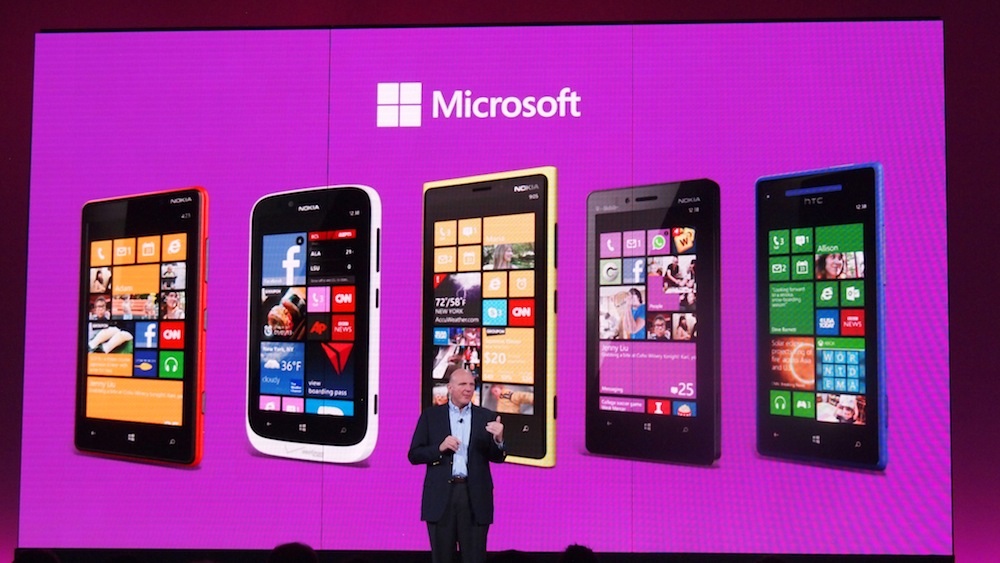
Microsoft has kept a tight lid on what parts of the OS we were allowed to see and what we weren’t up to this point, but today, the veil came off. Samsung, HTC, and Nokia each showed off their WP8 devices. Seeing the entire lineup together was quite impressive. This is undoubtedly Microsoft’s most varied and well-supported Windows Phone launch to date. For the first time, Microsoft has given manufacturers a lot more leeway to create handsets with more varied specs, features, and designs. These handsets offer a variety of screen sizes, resolutions, shapes, processing power, and unique features. While Nokia handsets boasted a suite of Nokia transportation apps, HTC is heavily pushing its ImageSense camera and Beats functionality. Samsung has plenty of unique apps and is stressing the connectivity between its Windows Phones and Windows 8 tablets. Phones also now seem to come in every color of the rainbow. The hands-on area resembled a Skittles commercial. Some phones even feature swappable shells, so you can change your color every day.

Kids Corner

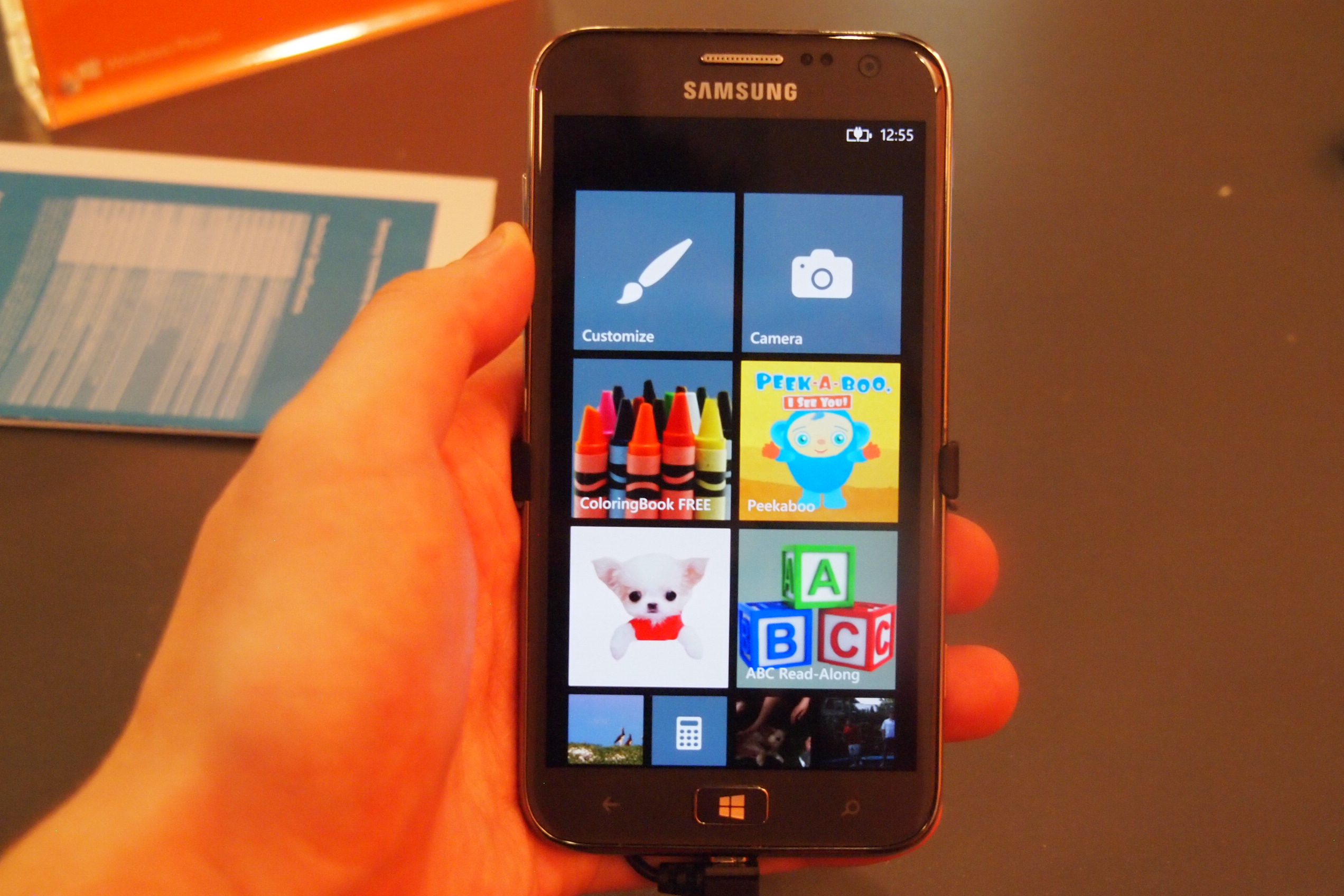
Now that the smartphone industry is maturing, it’s beginning to get more family friendly. Today, I got to try out Microsoft’s new Kids Corner feature: a sandboxed custom homescreen you can create just for your kids to play around in. For the tech-savvy parent, I have to say, this could be a killer feature.

Windows Phone 8 Kids Corner

Kids are annoying sometimes. They won’t shut up and they’re hyper as hell. But what if you could hand them your phone without worrying whether they’ll email your boss pictures of Barney? Now you can. WP8 lets you assign whatever apps, games, music, videos, or other content you want your kids to be able to access to a special homescreen. Turning the feature on requires you to dig into the Settings menu a little, but once it’s activated, you can hand your child your phone at its lock screen. All they have to do is swipe to the left to open a custom kid-friendly homescreen. They can move all the Live Tiles around however they please, and the Home button is deactivated, so you don’t have to worry about them escaping back into your content. A word of advice, though: Create a password for your lock screen. If you don’t, then your kids can still restart the screen and poof, they’re back in your email. 

Data Sense

Windows Phone 8 Data Sense

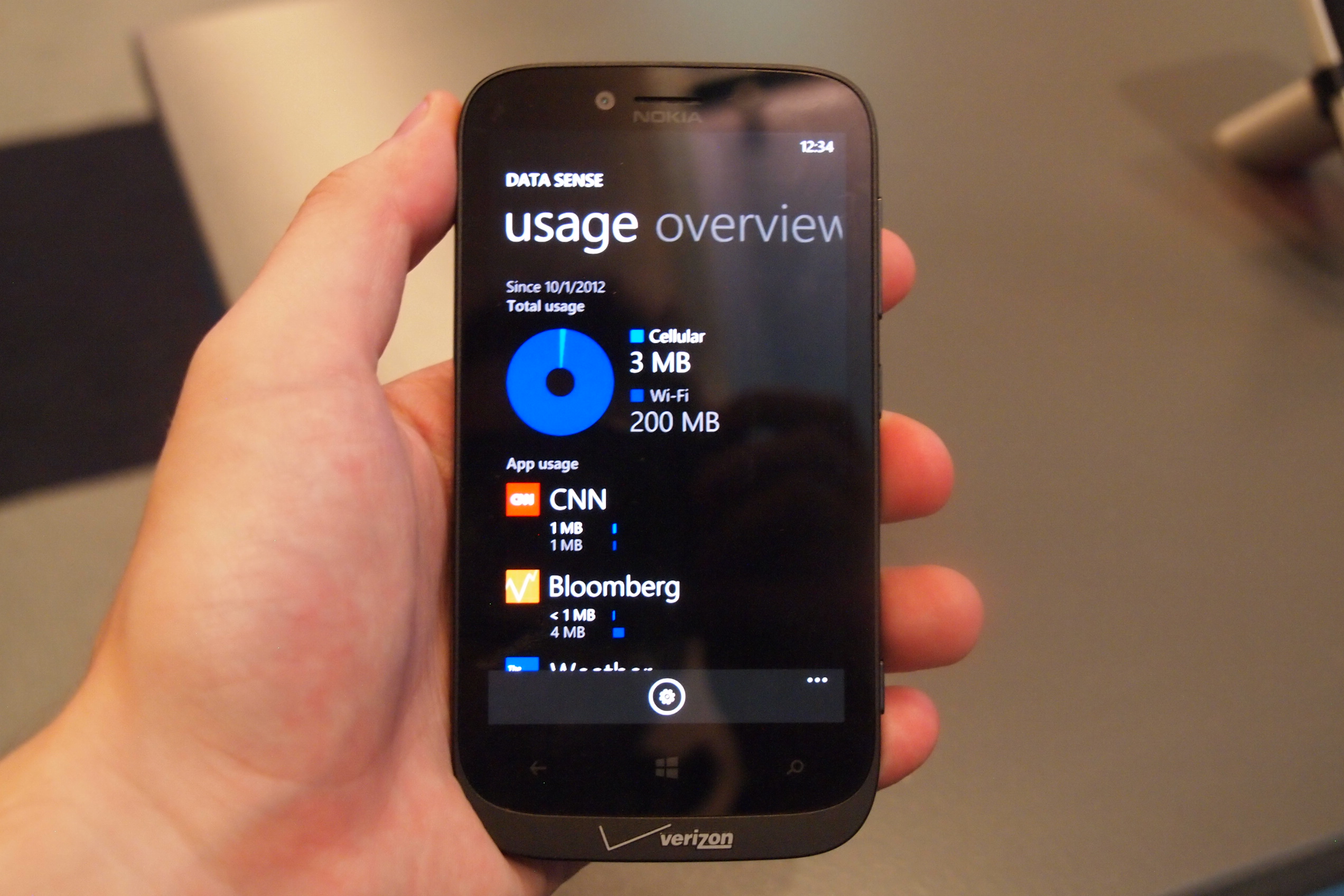
Microsoft has followed Google’s lead and integrated a data-monitoring feature in Windows Phone 8. Data Sense lets you set a data limit for the month (or another length of time) and will warn you as you pass thresholds like 50 percent of your data. Better, you can dig into exactly what apps are sucking up all of your data. I can’t believe that the iPhone doesn’t yet have a feature like this, but now every other major OS does. There isn’t a ton of depth to this app, but it’s value can be measured by the size of your phone bill.

Rooms for your people

Windows Phone has long pushed “hubs” as a way to aggregate large numbers of apps and features around certain topics. The People hub has been a good place to find your contacts and see recent social-networking status updates, but now it can do a little more. If you happen to have a group of friends who have climbed aboard the Windows Phone train like yourself, you can invite them into a “Room” with you. Rooms are kind of like Facebook used to be: exclusive. They have to approve you, but once you’re all connected, you can share content pretty easily.

I haven’t made my own group yet, but I did check out some pre-made groups. By swiping through pages, you can connect with your friends in a few different, useful ways. There’s an open, ongoing chat window, a shared calendar (which can connect to iPhone and some Android devices via a Web link), and photo sharing. It seems like a really great way for close friends to stay in touch. Hopefully Microsoft will continue to build on this feature.

Camera ‘lenses’

Windows Phone 8 camera lenses

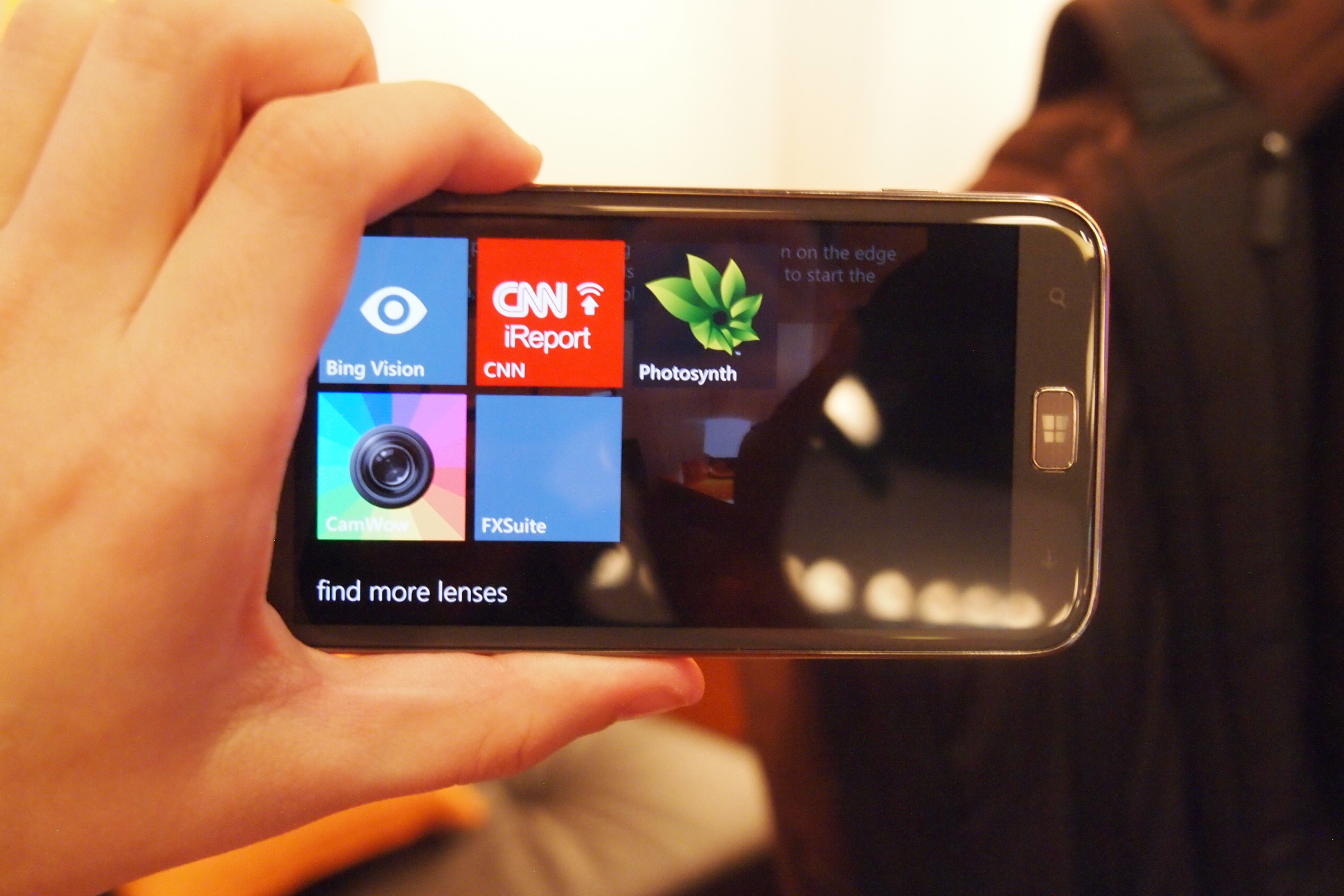
This feature doesn’t seem to be getting a lot of notoriety, but for fans of photo filters and apps, it’s pretty cool. While Instagram still isn’t on Windows Phone, there are a lot of cool apps that let you add effects to photographs and now Microsoft lets you access them directly from the Camera app. In essence, it’s now a Camera Hub. You can access these apps by just tapping one of the icons on the screen. Its easy and brings up a grid of apps. Press one and you can apply its feature or filter. Very cool. 

Better Live Tiles

Finally, I still haven’t gotten over how much nicer and more customizable the Windows Phone 8 homescreen looks. Because Microsoft is now allowing even more minute features and pages to be “pinned” to the Start screen, the variety of content is impressive. Every Windows Phone I saw today had a completely different and sometimes startlingly unique look to it — a few of them were so busy that I didn’t know where to start. Microsoft has always said that the Start screen reflects who is using the phone. For the first time, I think that’s true. Live Tiles can now be resized to take up an entire row, a standard square, or 1/4 square (practically an icon). You can do a lot with the Start screen now. Apps can communicate with their Live Tiles (and you) faster and better now too. You can even allow apps to show you information on your unlock screen, if you’re into that.

Windows Phone 8 vs iPhone 5

It’s looking good

Windows Phone has always been a nice-looking operating system, but with WP8, Microsoft seems to be smoothing out some of the gaps in its functionality and introducing more features that are unique to its platform. iOS and Android seem to chase and copy one another these days, but Microsoft continues to do its own thing. Now that Windows Phones like the HTC 8X will be on T-Mobile, AT&T, and Verizon this holiday season, there’s little reason not to at least check one out. You may like it. I’m may make the jump myself, if I’m able.


Source : http://www.digitaltrends.com/mobile/windows-phone-8-hands-on/

Friday, October 19, 2012

Microsoft Stores have stashes of vouchers for the Surface RT tablet

Microsoft is excited to release its tablet line-up along with Windows 8 next week, but it want to make sure it gets the Surface in as many hands as possible. Reports show a voucher program that may be in place to move units on launch day.

The happiest moment of Charlie Bucket’s life was finding the Golden Ticket that allowed him to tour Willy Wonka’s Chocolate Factory. Microsoft fans are finding their dream ticket is more of a light blue color. PC World is reporting a post on the WPCentral forums has revealed a voucher that is redeemable for a Surface RT tablet on its launch day, October 26.

There’s still a lot of mystery surrounding the actual program that the certificate appears to be a part of, but the directions on the card make its purpose pretty clear. The holder of the voucher is guaranteed a Surface with Windows RT as long as he or she shows up before noon on October 26. Obviously, purchase is still necessary, as the voucher isn’t currency. 

The original poster in the WPCentral forums stated his belief that it is likely early in the voucher-for-tablet program as his particular voucher was stamped with a “002″ at the bottom, signifying it is one of the first his particular retailer had given out. Follow up research has yielded information that supports this idea, as it seems most Microsoft Store employees haven’t even heard of these certificates. They are not a part of a pre-order program and appear as though they weren’t meant for mass consumption — they were meant to be handed out by managers, likely as a way to incentivize launch day purchases.

Sales shouldn’t be a major issue for Microsoft, as it appears on its site that the 32GB model of the Surface with Windows RT without the cover already has a 3 week shipping delay due to demand. Pre-orders are still available for launch day for the 32GB model with a Black Touch cover and 64GB with Black Touch Cover.


Source : http://www.digitaltrends.com/mobile/microsoft-stores-have-stashes-of-vouchers-for-surface-rt/

Wednesday, October 17, 2012

Asus PadFone 2 hands on: A phone and tablet merger that actually works

A hands-on preview of the Asus PadFone 2, an innovative device that combines a smartphone with a tablet, and somehow does appear to give us the best of both worlds.

There can’t be all that many people who don’t think that, in principle, the idea of the PadFone 2 is a good one. After all, it combines the two most popular — and fastest growing — consumer electronics markets into one handy device. At the PadFone 2’s launch event today, I had the chance to spend some time playing with Asus’s unusual device, and while it’s still not exactly clear at whom it’s aimed, it’s a clever machine with considerable potential for the future. Asus’s tagline for the tablet is “It’s intuitive.” I have to agree.

The first thing you notice about the smartphone is how light it is, feeling lighter in the hand than both the Galaxy S3 and iPhone 4, despite them all being within a couple of grams of each other. The phone is made of plastic, as is the brushed metal-look band around the edge, and since the rear panel is non-removable, the battery won’t be able to be swapped out for a new one.

Installed on the PadFone 2 at the event was Android 4.0 (Ice Cream Sandwich), but an upgrade to Android 4.1 (Jelly Bean) should be coming in December. This means the European PadFone 2, which should arrive early next year, will most likely come with the latest version of Android already installed.

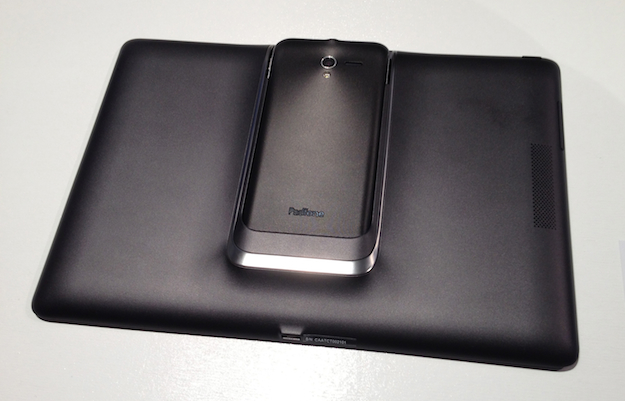
Padfone 2 Hands-on Front and Back

Padfone 2 Hands-on Dock

Quad-core power

The Snapdragon S4 Pro quad-core processor gives the smartphone incredible performance. Even without Jelly Bean’s “Project Butter,” scrolling was smooth and precise, and video was expertly handled. Scrolling could still be “sticky” in the browser though. A 1.5GB HD video file could be scrubbed back and forth with no delays in playback, and when the Adreno 320 GPU was put to work on a Need for Speed game, it looked stunning.

Grasping the tapered body of the PadFone 2’s phone section, it’s simple to slot it into the tablet and in fact, you don’t even need to look at what you’re doing. This makes perfect sense when you consider the sharing aspect of the PadFone 2, as you can be looking at a photo on the phone, which then appears on the tablet’s screen almost instantly when you dock them together. Fiddling around on the back of the tablet would spoil this experience completely.

Slotting the phone into the tablet station is precise and satisfying, and ends with a positive push to lock it into place, feeling not unlike docking an iPhone into a well-made audio dock. It’s not going anywhere either, as even turning it upside down and shaking it about failed to see the phone slip out and clatter onto the floor.

Padfone 2 Hands-on Back

Instant sharing, with a catch

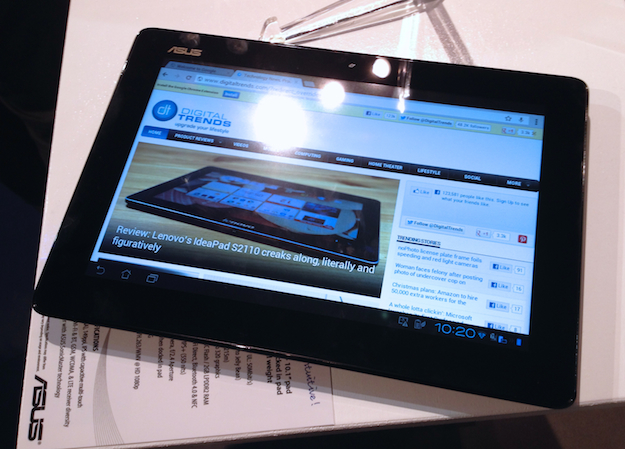
Using the tablet is a very similar experience to using the phone as it’s the same OS, but with this comes a slight drawback — the browser wants to open mobile websites. Visiting DigitalTrends.com, the BBC and YouTube on the tablet resulted in exactly that happening, but a better YouTube experience could be had using the standalone app. This is a problem on most Android tablets.

The instant sharing is also flawed at the moment, as it only works with certain applications. Say you’re reading a website using Chrome on the smartphone, but decide you want to read it on the larger screen, so you plug it into the tablet station. Sadly, it doesn’t just appear and you need to open Chrome as usual. Sure, your content is there straight away, but it adds a step or two to the process. The answer is to use the standard browser instead, which does instantly start when you dock the two devices, as does the gallery, the camera app, Google Play and the standard email app too. But generally, if you’re doing something on your phone before you plug it in, prepare to have to re-open that task.

Asus says that many apps are undergoing a certification process, so by the time the PadFone 2 goes on sale, this could all change. Hopefully it will, as it’s one of the standout features of the device.

Padfone 2 Hands-on Tablet

Intuitive and pleasantly surprising

Using the PadFone 2 for only a short time confirms that Asus is right to call it intuitive, primarily because of the instant sharing feature and the easy docking, but learning the ins-and-outs of the lightly skinned Android OS was a breeze too. This, along with the all-in-one nature of the PadFone 2, makes it a good choice for anyone new to smartphones and tablets.

Such simplicity, design innovation and power doesn’t come cheap though, with the 32GB model priced at 800 euros ($1,042) for the smartphone and the tablet station. Before you snort derisively at this figure, think about this: A 32GB iPhone 5 costs 790 euros on its own, and you’re stuck with that battery and that screen size. Add a 32GB Wi-Fi and Cellular iPad and you’ll need another 700 euros, giving a total of 1,488 euros ($1,940) for the pair. Pop over to Amazon for a SIM-free Galaxy S3 and a Galaxy Note 10.1 and you’ll still need the best part of 1,100 euros.

So, although the initial outlay sounds like a lot, that’s quite a savings when you consider how much buying two separate devices to emulate the PadFone 2’s abilities costs. It is, however, still a big price for a relative newcomer to ask for an quirky product. It could also be saved if U.S. wireless carriers decide to subsidize the phone and tablet combo deeply enough, it could be quite affordable. But with how badly the Motorola Atrix + Laptop Dock were priced, it’s difficult to be hopeful.

In the short time I had with the PadFone 2, it was certainly winning me over, and it’s impossible not to be impressed by the Snapdragon S4 Pro’s performance. I have the feeling a lot of people are going to be surprised by the PadFone 2, it just takes an open mind, a calculator and good, solid test run.

Video playing on the PadFone 2

The PadFone 2 camera


Source : http://www.digitaltrends.com/mobile/asus-padfone-2-hands-on/