


What kind of cases and covers, or Microsoft Surface accessories are available on the market right now? Join us as we take a look at some great options for the Surface with Windows RT and the Surface with Windows 8 Pro.
If you’ve been tempted by Microsoft’s new Surface tablets then you’ll probably be on the lookout for a new case and maybe some accessories. There’s no denying that the magnesium shell and Gorilla Glass 2 screen look tough – just check out the skateboard demo – but that doesn’t mean you won’t want some protection or a practical bag to carry your shiny new tablet in.
We’re also going to take a look at the options out there for Microsoft Surface accessories. There are a couple of adapters that might prove essential and everyone could use some extra storage. The choices for cases are limited, partly perhaps because the Surface tablet has a built-in kickstand (something that cases and covers often offer) and partly because manufacturers are unsure how popular it will be.
Anyone still undecided about the new tablets should check out our Microsoft Surface with Windows RT review to find out how it stacks up.
Touch Cover ($120)

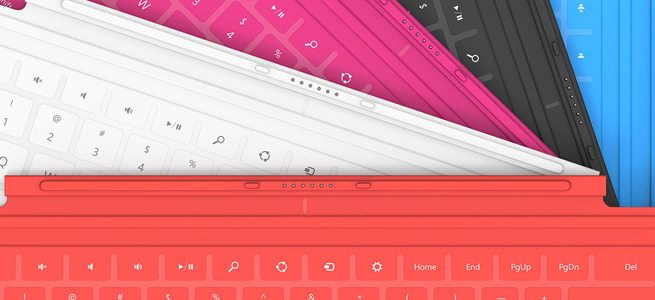
This super-slim, pressure-sensitive keyboard doubles up as a protective cover. It also has a trackpad and some handy Windows shortcut keys. It snaps into place with a magnetic seal that’s quite strong. It’s great to have a keyboard cover that’s only 3.5mm thick and weighs just 0.46 pounds, but there is a drawback. Most reviews have pointed out that it is uncomfortable to type on because it is so flat and unresponsive. The color choices of cyan, magenta, and red are also going to put some people off, but don’t worry they come in black and white as well.
Type Cover ($130)

It is bigger and it only comes in black, but for serious typists the mechanical keys of the Type Cover are going to be far preferable to the Touch Cover keyboard. It is still only 6mm thick and it weighs 0.55 pounds. It also has the trackpad and shortcut keys and it clicks on with the same magnetic attachment. The Type Cover really makes the Surface feel like a laptop and it’s much easier to get used to than the Touch Cover which makes it well worth the extra $10.
Incipio Padded Nylon Sleeve ($40)

A nylon sleeve isn’t going to offer major protection from bumps, but it will keep dust and scratches at bay. The close-seamed zipper has a neoprene lining and rubberized pulls for ease of use and comfort. The inner lining is soft, faux-fur which provides some cushioning from bumps and there’s a handy external pocket with a zipper for extras. It comes in a range of two-tone color combinations and it’s one of the few options on the market right now designed specifically for the Surface.
Surface HD Digital AV Adapter or Surface VGA Adapter ($40 each)

If you were expecting to find any extras beyond the power supply in your Microsoft Surface box then you’ll be disappointed. Many will consider these pricey adapters to be essential, and they are described as “proprietary”. For $40 a piece you can get an adapter for any HDMI-compatible display or one for any VGA-compatible display. This is definitely the simplest way to see your Surface content on a big screen or through a projector. Don’t feel that you have to splash out for the official adapter, though, because the Surface has a standard micro-HDMI port so any HDMI-to-micro-HDMI cable will do and if you shop around there’s no need to spend more than $5.
SanDisk microSD Memory Card ($10 to $60)

Since there is actually only 16GB free in a 32GB Microsoft Surface you might be looking for extra storage sooner than expected. The Surface supports microSD, SDHC, and SDXC memory cards. You can pick one up from Amazon at about $10 for 16GB up to about $60 for a 64GB card. You’ll find the memory card slot behind the kickstand. For cheap storage without any added bulk a memory card is your best bet.
Thumb drive or flash drive ($10 to $60)
The Surface tablets also have a USB port. The RT has a USB 2.0 port and the Surface with Windows 8 Pro has a USB 3.0 port. If you invest in a fast flash drive you’ll be able to transfer files quickly and easily. You can back up emails or documents and you can watch movies or listen to music. These handy accessories are a cost-effective and convenient way to boost your storage capacity and they’re great for transferring files from your old PC or laptop. They come in all shapes and sizes and you can find a comparison via the link above. If you need more space then consider an external hard drive instead.
Bluetooth Headset ($50 to $150)
With support for Bluetooth 4.0 you could choose any Bluetooth headset to use with your Surface. The tablets do have built-in dual digital mics, stereo speakers, and a camera, but some people prefer a headset when they Skype. Whether you want to go for the Plantronics Voyager Legend or something from Jawbone, Motorola, or Aliph, really depends on your requirements and your budget.
Xbox 360 Controller ($40)

All the gamers out there will be glad to learn that the Surface tablet supports wired Xbox 360 controllers. It won’t work with wireless controllers, but just like any Windows PC, if you plug a wired Xbox 360 controller into the USB you’ll be able to play games with it. This is more exciting for the Windows 8 Pro version of the Surface tablet because it will support a lot more games. It will be interesting to see whether Microsoft tries to make XBLA games available as it pushes more cross-compatibility with the Xbox 360 in your living room. The second screen app soon to be released on Windows 8 and RT, Xbox SmartGlass looks like the first step.
More ideas
The fact that the Surface tablets boast USB ports and have Bluetooth support means there is already a long list of potential Surface accessories. There’s no need to wait for a bunch of dedicated accessories to be released. You may well find your existing mouse or Bluetooth headphones will work with your new tablet. Post a comment and tell us about your favorite Surface accessories so far.
Source : http://www.digitaltrends.com/mobile/surface-tablet-cases-and-accessories-roundup/


