Huawei is yet to announce any phone, running the latest Windows Phone 8. However no less than two of their smartphone are making the internet rounds thanks to various leaks.
The Huawei W1 was leaked even before Windows Phone 8 launched. The freshly leaked W2 however, has a bigger (probably higher res) screen. There's also an 8 megapixel camera on the back capable of shooting FullHD videos.
Huawei W2
Unfortunately, besides the home-made photos, we don't get much else in terms of specs or availability info. Nobody releases new phones this late into the holiday season, so we'll guess both phones will see the light of day at either CES or MWC in the beginning of next year.
We go hands on with the newest version fo Pulse News for Android and iOS with new features like a sidebar, enhanced search, new design, and better scrolling, making it one of our favorite news aggregators.
Every news organization wants to have its pulse on the topic it focuses on. In the ever broadening scope of news that the Web allows for, there is more specific niche coverage than ever before; it can take extra clicks to get all the news you need. This is where a good news aggregator comes in, and there are few more notable than Pulse News. But even the big names need a new look every once in a while. If you use Pulse on an Android or iOS device, you may notice a new look to your favorite news aggregator. As it turns out, there’s plenty of substance to go with the style, as well.
The redesign to the Pulse News app comes to provide a uniformed look across platforms. Namely, it makes the mobile app fall more in line with the look that the recently launched Web app established. It’s similar to the earlier version, but is a little slicker and somewhat reminiscent to Windows 8 in its boxiness. This works to its favor, as the layout is very intuitive and manages to make information for a wide range of sources look like it belongs in the same app. Gone is the horizontal, tab-style browsing. A new sidebar is your guide to the news. It’s simple and there’s a lot less jumping back and forth. It’s definitely an improvement in navigation.
This navigation enhancement lets you scroll through a lot more content than before. You are no longer limited in the number of pages you can create or news feeds listed on a page. In past versions, users had their feed subscriptions and pages capped, forcing choices like “Do I want to get updates from the Ellen Degeneres Show or Field and Stream Magazine?” Now you can get it all, so your eclectic choices needn’t be stifled. Having the ability to create an unlimited number of pages is probably the biggest improvement in the update, as you can now dedicate just a couple sources from a particular category and not feel like you’re throwing away potential space for other content. If you’re really into motorcycles and want to create a separate page for it, you can do so and just keep the two or three feeds relevant to that without fear of wasted space.
New to the Pulse News app is the ability to search for specific news not within your pages. It scans across everything from Google and Tumblr to Reddit and YouTube for content that fits your keyword and allows you to subscribe to updates on the given topic.
All of this adds up to a solid update. If you haven’t used Pulse News before, this is a good time to do so. With the addition of unlimited content feeds and personalized organization, Pulse has to be considered a top contender for news aggregation. It gives you access to some great, well-respected sources and lets you add your own if you don’t see what you’re after. Pulse News has all the news that’s fit to pixelate.
Owners of the latest Apple gadgets can now get their hands on JBL's new range of docking speakers, created especially for the iPhone 5, new iPad 4/ mini and the latest iPod touch incarnation.
The JBL OnBeat Micro (£79.99) and JBL Venue LT (£199.99) are the world's first speaker docks built to support the new Apple range.
The JBL OnBeat Micro is battery powered and small enough to be carried around when on the move. Playback lasts up to five hours (likely depending on the batteries), and the device doubles up as a charger when connected to a mains outlet. The OnBeat Micro features both a Lightning and USB connector, allowing you to play music from non-Apple devices too.
The dock comes with a downloadable phone app that allows users to create customised playlists, browse album artwork and use their device as a volume controller.
Lightning connector
The JBL OnBeat Venue LT is the bigger brother of the two docks, a tabletop wireless speaker built with the new iPad 4 and iPad mini in mind. The dock can be connected to up to eight devices via its TrueStream Bluetooth tech, again allowing compatibility with non i-branded devices.
The OnBeat Venue also features a Lightning dock connector, dual full-range drivers with Slipstream port technology and the free MusicFlow app, which appears to be a beefed-up version of the Micro app, adding the ability to edit mixes and fiddle with EQ settings.
Both the JBL OnBeat Micro and the OnBeat Venue LT are available now through selected retailers.
Apple has partnered with Flipboard to showcase its iBookstore books through a new section of the magazine-inspired app on iOS.
iPad, iPhone and iPod touch Flipboard-users will be able to browse and buy books through the app, with Flipboard apparently taking 5 per cent of every sale.
The new section is Apple's iBookstore, and the uncharacteristic partnership should solve the Cupertino crew's big problem of getting the right books in front of the right people – browsing the iBookstore is onerous at best.
But Flipboard is geared towards finding new and interesting things, laid out in a deliciously eyecatching way.
Read only
It's not quite the same as whiling hours away in a dusty old bookshop though - the new biblioboard section turns out to be little more than a glorified catalogue.
Still, you'll be able leaf through the latest and most popular books in 25 various categories, from bestsellers to fiction and literature, children and teens, biographies and more.
Once you've bought a book, you won't be reading it in the Flipboard app though; it only showcases the description, cover art and link to buy – everything else takes you out of Flipboard and into iBookstore and iBooks.
The new book section is live now in the iOS Flipboard app in the US, UK, Australia, Canada, Brazil, France, Germany, the Netherlands, Italy and Spain.
The AT&T version of the Nexus 7 with cellular data has sold out just two days after appearing on the Google Play Store.
Although it did not get as much publicity, the Nexus 7 with Mobile data was released alongside the new Nexus 4 smartphone and Nexus 10 tablet. As you may recall, the Nexus 4 and Nexus 10 saw some unprecedented demand, as both devices sold out within an hour.
The Nexus 7 tablet made its debut alongside Android 4.1 Jelly Bean in July of this year at the Google I/O convention in San Francisco. It features a quad-core 1.2 GHz processor on the Tegra 3 chipset, a 7 inch screen of 800 x 1280 pixels, 16/32 GB of storage, all powered by a 4325 mAh processor.
Google should hopefully be stocking up again on all of their Nexus devices in time for the holidays, where you can get the cellular version of the Nexus 7 with 32GB storage for $299.
But beyond whizzing a few web pages up and down, and "testing" that Angry Birds runs nice and smoothly, just how do you check the speed of a device?
For an age the process has been dubbed benchmarking after the standard bench mark symbol used by surveyors.
On computer systems it's a standard test that can be rerun many times to assess performance across a range of devices in a comparable way. Generally a benchmark will involve testing a single aspect of performance, while an overall system score can be found using a suite. Though it can be somewhat meaningless.
Tests cover raw processor speed or how fast it performs functions, storage access speeds, 3D performance with how many polygons it can draw a second and how detailed effects it can handle, and finally task-specific tests such as browser speed. Because of the range and complexity of these tests, it's rare that a single one covers all bases. A
nother issue is that cross-platform test for Android Vs Apple Vs Blackberry Vs Windows RT are even more complicated, and somewhat rare. But to get you started here are our recommendations.
1. Vellamo
The latest benchmark app for Android is called Vellamo and you can install it for free from the Google Play Store.
Developed by Qualcomm, this is the company that designs and manufacturers some of the most widely used phone and tablet processors, so it should know what it's doing. This latest version of Vellamo has been updated to fully test browser speeds running HTML5 tests, plus a suite of dedicated processor speed-tests that are called Metal. An Extras section also includes streaming video tests. The tests can take a while to run but once complete you can compare your results with a host of other Android devices.
2. AnTuTu
One of the most widely used benchmarks for Android devices is called AnTuTu and it's free on the Google Play Store. Everyone loves a big number and AnTuTu provides just that, from its comprehensive range of tests – that drive everything from the 3D graphics to the processor as hard as possible – it manages to derive an overall score for your device. You're then ranked against a raft of other popular devices or you can upload it to the online rankings. While this is great for a quick off-the-cuff compraison it's doesn't exactly provide insight into performance differences between devices.
3. Geekbench 2
How do you boast that your Apple iPad 3 is faster than your friends Samsung Galaxy Note? It's not easy but one of the few good choices is the 69p Geekbench 2 available on the Google Play Store and from the Apple iTunes App Store.
As the name might suggest it's somewhat more complex to understand but can provide a simple number that you can argue about down the pub. Being available on both Android and Apple iOS it does help fuel the argumentative fires. It's more of a limited test only really pushing the processor and memory aspects.
4. SunSpider
Another cross-platform benchmark that runs on Apple, Android and anything that has a web browser is SunSpider found at webkit.org. his tests something called JavaScript, which is a core aspect of web site and browser performance. It runs a suite of browser-based tests multiple times and will generate a time in milliseconds, the lower this is the faster the browser and processor is.
This test is an interesting one as it tests both the speed of the web browser and indirectly the processor as well. It enables you to test different web browsers on a device and see which is the fastest for web browsing. Or if you use the same browser on different devices enables you to compare processor speeds.
5. GLBenchmark
Finally we have the current lead for 3D benchmarking the imaginatively named GLBenchmark from Kishonti. Pure 3D benchmarks often come under fire - usually from the party that has the poorer score - that they're unrealistc or don't represent real gaming performance. There is a point about lack of optimisation within these that a game could leverage, but the point is these are benchmarks that provide a level playing field and a guide to overall performance. Not potential performance gained via tweaks.
When running GLBenchmark it's important to keep in mind that different devices have widely different resolutions. So you'll see the Apple New iPad 3 getting lower or similar scores to the supposidly slower Apple iPad 2, that's entirely down to the far higher resolution and so number of pixels the New iPad GPU has to push around.
A new leak has provided further details on Windows Phone 7.8, including several new features, however there's a chance the update won't be available until early next year.
We last talked about Windows Phone 7.8 at the end of October, just after Windows Phone 8 made its official debut, where we focussed on a potential release date. At the time, there wasn’t much information on that or the possible features either, but Microsoft did promise “more information in the coming weeks.”
Software updates wait for no man though, and the Chinese blog winp.cn has been handed a slide said to be from a Nokia presentation kit, which reveals a few more potential features of Windows Phone 7.8.
Now, do remember this is a leaked slide written in a language I can’t read, which was published on a blog that Google Translate had to cast its magic powder over before I could understand it. The salt is on the table, and generous pinches have been taken.
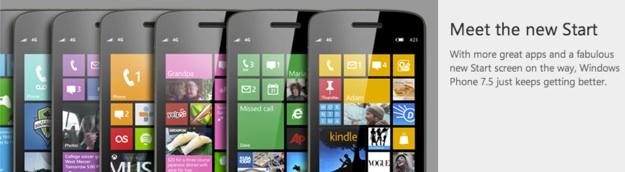
Anyway, moving on. The slide once again confirms that older Windows Phones will be getting the new Windows Start screen, with a choice of three different sizes of Live Tile, plus a choice of 20 different colors. It continues to say that stored music can be edited into ringtones, the lock screen can use the current Bing wallpaper, and Internet Explorer will be getting a series of security upgrades. Because of this, it’s unlikely Windows Phone 7.8 will come with IE 10.
Nokia will further enhance Windows Phone 7.8 by adding Bluetooth file sharing and the easy transfer of contacts to another phone, but expect these to only work on Lumia devices. All this joins other potential features such as Xbox SmartGlass, Xbox Music and the chance of the new Rooms hub for sharing calendars with friends.
Finally, a tweet from Windows Phone Brazil has indicated devices in that region won’t be seeing WP7.8 until sometime between January and March next year. This may not apply to the rest of the world, but it does fit in with the rumor that Windows Phone 7.8 will be applied to brand-new phones first, before being sent out to older phones as an update.