Thursday, December 6, 2012

HTC Butterfly announced for the international market

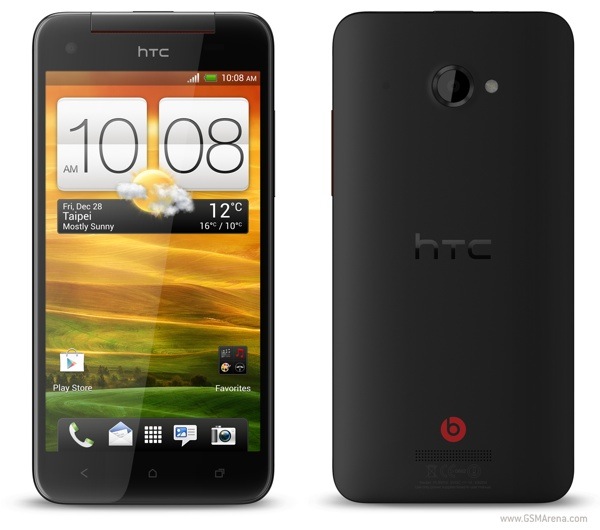
HTC has officially unveiled the Butterfly, which is the GSM variant of the J Butterfly released in Japan two months ago.


For those who are not aware, the HTC J Butterfly is the company's first smartphone with a 1080p display. The Butterfly is almost identical to the J Butterfly, except it is designed to run on GSM networks worldwide.

To recap the features of this device, the HTC Butterfly has a 5.0-inch, 1920 x 1080 resolution, Super LCD 3 with Gorilla Glass 2, Qualcomm Snapdragon S4 Pro APQ8064 SoC with a dual-core 1.5GHz Krait CPU and Adreno 320 GPU, 2GB of RAM, 16GB internal memory (no microSD card slot), 8 megapixel rear camera with 1080p video recording, 2.1 megapixel front facing camera, Wi-Fi 802.11 a/b/g/n, Bluetooth 4.0, A-GPS + GLONASS, NFC, 2,020mAh battery and Android 4.1 Jelly Bean.

Source


Source : http://www.gsmarena.com/htc_butterfly_announced_for_the_international_market-news-5171.php

RIM offering incentives to switch to BB10

RIM offering incentives to switch to BB10
RIM is beginning its push for BB10

RIM is betting the farm on the release of its BlackBerry 10 operating system. Having not released a new phone in roughly 18 months, the Canadian smartphone company has a lot of work to do to make BB10 succeed.

To help its new operating system, RIM has just launched an incentive program for its business customers to upgrade to BB10.

Called the BlackBerry 10 Ready Program, it will offer RIM's larger customers online training and webcasts, as well as free trade ups of licenses and services to the new BB10 platform.

Trading up

Companies already using BlackBerry Enterprise Server will benefit the most, with RIM offering free upgrades to the BB10 server on a one to one basis, between January and December 2013.

"Starting in January 2013 through to December 31, 2013, Research In Motion (RIM) will be offering customers who purchase new BlackBerry 10 smartphones, the ability to trade up their existing BlackBerry Enterprise Server licenses on a one for one basis for free.

"The new license trade up will allow customers to secure and manage their BlackBerry 10 smartphones.

The BlackBerry Enterprise Server License Trade Up online tool will be available in January 2013, and will be subject to customers accepting the terms of the Trade Up," RIM explains on its website.

Getting the business market on board with BB10 is one half of RIM's battle with its new BB10 platform. The other half is getting consumers to buy the new range of handsets.

While nothing has been announced yet, it's safe to say we can expect a massive marketing campaign around the globe following the official product launch on January 30, 2013.

Via: Reuters, Ubergizmo


Source : http://www.techradar.com/news/phone-and-communications/mobile-phones/rim-offering-incentives-to-switch-to-bb10-1117698

Tim Cook talks: Quotes from Apple’s CEO and what they could mean for the company

Apple CEO Tim Cook

As 2012 comes to a close, Apple CEO Tim Cook has sat down with the media to discuss what's at the company's core.

Apple has never been a company to talk at length to the public. The Silicon Valley-based computer design firm has always prided itself on keeping projects under wraps, ensuring that any upcoming product launch would be met with a certain element on mystery and surprise. While it may seem as if some tidbits about Apple’s recent iPhone 5 and iPad Mini devices had leaked out prematurely, one this is for sure: When Apple wants you to know something, not guess or speculate, Apple will tell you.

This is the mantra Apple CEO Tim Cook has taken on recently, as the 52-year-old chief divulged in a whopping 11-page interview with Bloomberg Businessweek. If that wasn’t enough, Cook will also appear in his first on-air interview tonight via NBC News’ Rock Center With Brian Williams.  The end of 2012 marks the closure of Cook’s first full calendar year as CEO of Apple, making him what some have called the most powerful man in business.

Here’s a snapshot of interesting quotes from Cook’s recent conversations and what they tell us about Apple.

On why working at Apple is great (Bloomberg)

In the interview with Bloomberg, Cook couldn’t stress his love for Apple enough. What makes it so intriguing and special to him, he said, is that people care about the company just as much as they care about the product.

“It’s not a letter like you might think is written to a CEO,” said Cook. “It’s not this formal kind of stuff. It’s like you and I are having a discussion, and we’ve known each other for 20 years, and I want to tell you what I really think. I love it. I don’t know if there’s another company on earth this happens with. It’s just not people from the U.S. These are people from all over the world. I look at it, and I go, ‘This is a privilege.’”

The CEO also reminisced about his first day at Apple, which began with him pushing through a swarm of protesters picketing outside of Apple’s offices after Jobs had decided to axe the Newton device back in the early 90s.

On what drives the company (Bloomberg)

Cook has made it clear that he plans to uphold the principles and standards established by Steve Jobs.

“In creating these great products we focus on enriching people’s lives – a higher cause for the product,” Cook told Bloomberg. “These are the macro things that drive the company. They haven’t changed. They’re not changing. I will not witness or permit those changes because that’s what makes the company so special.”

On transparency (Bloomberg)

Ironically enough, while stuck amidst ongoing patent debacles with Samsung, Cook has outwardly admitted that he wants others to copy Apple. Apple commercialized the tablet trend when it launched its first-generation iPad back in 2010, and has remained dominant in that industry ever since. It’s safe to assume this is the type of “copying” Cook is referring to – sparking a trend that catches like wildfire throughout the tech industry.

“We decided being more transparent about some things is great – not that we were not transparent at all before, but we’ve stepped it up in places where we think we can make a bigger difference, where we want people to copy us,” said Cook. “So there are things that are different, but the most important thing by far is, the fiber of the place is the same.”

On Apple TV (NBC)

The idea of an Apple TV set has been highly-rumored for quite some time, and on NBC Cook acknowledged that it’s a venture Apple is looking into. 

“When I go into my living room and turn on the TV, I feel like I have gone backwards in time by 20 to 30 years. It’s an area of intense interest. I can’t say more than that.”

On Apple Maps (Bloomberg)

“We set on a course some years ago and began to do that,” he said. “So it wasn’t a matter of saying, ‘Strategically it’s important that we not work with company X.’ We set out to give the customer something to provide a better experience. And the truth is it didn’t live up to our expectations. We screwed up.”

We mentioned earlier that public addresses and quotes from Apple are a rare occurrence, but even more rare is a public apology. When Apple Maps launched with iOS 6 back in September, its was received with such criticism that Tim Cook issued an apology to users on Apple’s official website. Users complained that Apple’s first self-branded navigation app lacked thorough public transportation directions and labeled locations inaccurately. The company recently fired Richard Williamson, who was in charge of spearheading the troubled app. 


Source : http://www.digitaltrends.com/mobile/tim-cook-talks-5-recent-quotes/

Rhapsody launches SongMatch, its first auxiliary mobile app and Shazam rival

Rhapsody unveiled SongMatch, its first standalone mobile app that competes directly with Shazam but offers music playbacks.

Finally after weeks of bug fixes, Rhapsody has launched its answer to Shazam and Soundhound, called SongMatch for U.S. users. Except unlike the competitors, Rhapsody SongMatch guarantees that it treats its users better.

Shazam is arguably the most recognizable song matching service. It started out as a music discovery tool to tag the artist to a track playing that you either can’t remember or don’t know at all. But music playback is limited to 30 second excerpts. With the way Shazam works, it encourages users to make purchases for the full track through iTunes instead (though you can play them back via YouTube video).

rhapsody songmatch

Rhapsody is solving this pain point with SongMatch. SongMatch users, granted that they’ve subscribed to Rhapsody and own an Android phone, can tag the songs playing in the background, find new music by the same artist, find similar artists, and play the tagged song. If you haven’t subscribed to Rhapsody, SongMatch is still free to download and free to use, but the only feature disabled is playback. 

Streaming tracks using SongMatch would use less data and battery than via YouTube videos, like in Shazam. That for starters is a plus, but an additional perk is that once users tag a song, the tracks are stored in a Rhapsody playlist with you can access as you wish on any supported devices including your tablet, smartphone, or TV.

I talked to Rhapsody’s Head of Product Paul Springer prior to the launch of the standalone SongMatch app, and the impression that I was getting from him was that Rhapsody is venturing into building out mobile-driven products to increase user engagement with its services. “Mobile is so important for customers, and increasingly an important part of their lives. And our mission is to create a daily habit with customers around music and around listening. That necessitates that we help solve some of the problems they have in mobile in a better fashion,” says Springer.

For those of you that are curious SongMatch’s music recognition tech is powered by Gracenote, which only needs the first few seconds of the song to recognize the track.

There really isn’t much of a monetization strategy behind releasing SongMatch. SongMatch is 100 percent ad-free. For now Rhapsody is primarily concerned with two types of users with the music discovery feature (which, ultimately, is about engaging consumers with Rhapsody’s music streaming service of 16 million songs). First it’s the existing subscribers that can play more music and stay engaged with Rhapsody longer. If users aren’t finding value in the subscription, no matter the cost, Springer found, they’ll click the unsubscribe button right away. “My goal is to create a daily habit, so I’m not going to stop until every customer is using Rhapsody every single day, and ingrained as part of their daily habits. And we’re seeing very good trends in that direction,” says Springer. SongMatch is the first mobile “purpose-built” apps to boost engagement and there are more auxiliary apps in the works. Second, by offering a robust songmatching product, Rhapsody hopes that it can acquire new subscribers that might be fed up with not being able to play back songs. New users can sign up for a trial without entering in their credit card, which fuels new customer acquisitions.

Rhapsody’s SongMatch app can be downloaded from the Google Play Store and Amazon App Store. The app for iOS and other devices is in the works, but Springer declined to provide a timeline.


Source : http://www.digitaltrends.com/mobile/rhapsody-songmatch/

Galaxy S3 problems: What users complain about the most

Have you encountered any problems with Samsung’s flagship Android smartphone? We take a look at some of the most vexing Galaxy S3 issues and see if we can find solutions or workarounds for you.

Some people felt it was too big, but the Samsung Galaxy S3 has been selling steadily since it first hit the market back in May. Samsung sold 20 million Galaxy S3 handsets in its first 100 days and it has become the poster child for Google’s Android operating system. Several months down the line, the Galaxy S3 continues to surpass expectations in terms of sales, but no device is flawless.

Let’s take a closer look at some of the biggest Galaxy S3 problems. These are the most commonly seen complaints from people around the world, and in each case we’ll try to offer up a useful workaround or solution.

Battery drain

Problem: Disappointing battery life is the Achilles heel of all smartphones, but some people have encountered a surprising battery drain on the Galaxy S3, even when the phone is not in use.

The international version of the Galaxy S3 has a flaw. The battery drain on standby issue is complicated by a miscalculation in the power profile which shows Cell standby eating a lot more power than it actually is. This doesn’t account for the drain it just means that the stats are wrong.

Some people with the U.S. and international versions have also reported an actual excessive battery drain on the Galaxy S3 when in standby. Having apps running in the background and features such as Wi-Fi, mobile data, Bluetooth, and push email turned on is obviously going to have an impact. If your Galaxy S3 is draining fast when not in use, then it can be tricky to find the culprit. It could be down your carrier or that you get poor service in your home; it could be Chrome; it could be email or LTE. Luckily there are some solutions you can try.

Solutions: If you have Chrome installed, fire it up and choose Settings > Developer tools and then uncheck Enable Tilt Scrolling.

Some people have reported huge battery savings by turning off LTE in Settings > More settings > Mobile networks > Network mode. There’s a theory that if you don’t have LTE in your area, the battery drains faster because the phone keeps searching for it. Having Wi-Fi turned on all the time can actually help because it uses a lot less power than connecting to a mobile network, but you have to be in range of a Wi-Fi network or the search for a connection will have a similar draining effect.

Some people believe that Samsung’s preinstalled apps could eat a lot of battery life even if you’re not using them. Some users reported success after disabling their Samsung account and various Samsung apps. Go to Settings > Applications manager and choose the All tab then disable Samsung Account, Samsung Backup, Samsung Apps, Samsung Cloud Data Relay along with anything else on the list you don’t use. The disabled apps drop to the bottom of the All list so you can always enable them again if you encounter any problems.

Audio and microphone issues

Problem: It’s difficult to have a phone conversation when the other person can’t hear you clearly or you can’t hear them. Some early adopters reported issues with the Galaxy S3 microphone and found that signal strength was dropping immediately after calls. The speakerphone function hasn’t worked smoothly for some and a complete loss of audio has been reported in extreme cases. A firmware update was rolled out to fix this, so you shouldn’t be experiencing these issues anymore. If you are, then it may be down to a blockage, a setting, or even the noise reduction feature.

Solutions: Restarting the phone should temporarily resolve the issue, but that’s obviously not ideal so let’s try and find a permanent fix. Go to Settings > Accessibility and make sure Turn off all sounds is not checked to begin with. Now go to Settings > Sound and make sure your volume levels are correct and sound is turned on.

Hit Phone > Menu > Call settings > Additional settings and then uncheck Noise reduction. Some people have reported less echo and clearer calls with this turned off.

Take a look at the microphone hole on the bottom edge of your Galaxy S3. If it looks like there’s something stuck in there then that could be your issue. Be very careful when cleaning this. Try compressed air to blow it out first.

Overheating

Problem: Many users have reported problems with their Galaxy S3 overheating and sometimes even freezing or crashing as a result. The S3 is very thin with a big screen, a big battery, and a powerful set of internal components, so the more you use it, the hotter it will get. This generally only rears its head as an issue after prolonged gaming or if you do something else that’s graphically intensive. If your Galaxy S3 is getting very hot and crashing without intensive use, then you might have a hardware problem.

Solution: The obvious solution is to take a break for a few minutes and let the phone cool down. If you’ve been running something for hours, then it will inevitably heat up. If it is heating up on standby or with low levels of usage, then you should contact the seller or carrier and check if the hardware is faulty. You should be able to get a replacement handset if they confirm the problem.

Wi-Fi dropping or not detecting

Problem: Are you having trouble connecting to Wi-Fi networks? Maybe your S3 is connecting fine, but then dropping the connection later? There have been plenty of reports of troublesome Wi-Fi and for some people this is a wider Android issue, while for others it could be related to the router. Fear not, there are some things you can try on your S3.

Solution: Turn your phone off and then back on. The mantra of the IT professional does work, but it’s obviously not a permanent fix. You should also go to Settings > Wi-Fi and hit the menu button again to choose Advanced and make sure that Keep Wi-Fi on during sleep is set to Always. Most people with this issue are reporting that an over-the-air update fixed it, so if you are still having problems it is likely to do with your router. You could try an app like Wifi Analyzer and see if you can identify the problem.

Lag

Problem: When you buy a powerhouse like the Galaxy S3 you don’t expect any lag when you are navigating around. If you’re experiencing a slight delay when you hit the Home button or when you exit an app then it might be down to your settings. You should avoid using task killer apps and reboot your phone fairly regularly to clear memory.

Solution: Drag down the notifications bar at the top and switch off Power saving. It’s a useful feature for saving power, but it does introduce some slight lag. If your problem is related to the Home button, then S-Voice might be the culprit. Samsung has it set up so that a double tap on the Home button launches S-Voice, which can cause lag when you press the Home button. To get rid of it simply double tap the Home button to launch S-Voice and hit menu to access Settings and then uncheck Open via the home key.

The animations slow things down so you can always go into Settings > Developer options and change Window animation scale and Transition animation scale to .5x or even off.

Vibrating to music or audio

Problem: If you find that your Galaxy S3 is vibrating when you play music or when you use specific audio apps then you may well wonder why. Thankfully it’s an easy fix.

Solution: Go to Settings > Sound and make sure Auto haptic at the bottom is toggled off.

Copy and paste isn’t working

Problem: There have been quite a few reports of problems with the copy/paste feature on the S3. Some people are copying and then finding they have no option to paste and others are experiencing crashes when they try to paste copied text.

Solution: The solutions for this one are not ideal. You can factory reset the phone or you can root the device and clear the data from your clipboard. Sadly there’s no guarantee that the problem won’t return if you factory reset. Samsung is definitely aware of this issue, but it has not come up with a fix yet.

Smart stay doesn’t work

Problem: The Smart stay feature is designed to ensure that the screen does not turn off when you are looking at it. You’ll find it in Settings > Display and you can tick to turn it on. You’ll see an eye icon pop up in the notification bar occasionally and the S3 will use the front-facing camera to check that you’re still looking at the screen. If you are looking at the screen, it stays on, if you aren’t then it dims and turns off. How often it checks depends on your Screen timeout setting. A lot of people find that this feature doesn’t work for them at all.

Solution: Your face has to be well lit so the camera can see it. If you are in the dark or in shadow it simply won’t detect you and the screen will turn off. This feature is neat, but it doesn’t work well yet.

Workaround: Change your Screen timeout so that it doesn’t turn off so quickly.

More S3 problems

If you are irritated by unwanted notifications, then check out our guide on how to turn off Android notifications. If you’re sick of waiting for the Android 4.1 (Jelly Bean) update, then check with your carrier. The majority will push it out over the air, but some require you to physically connect your phone to your computer.

There are various other little Galaxy S3 issues and annoyances you might come across as you use the phone so please post a comment to share issues and any fixes you know of.


Source : http://www.digitaltrends.com/mobile/galaxy-s3-problems-what-users-complain-about-the-most/

T-Mobile US will officially carry Apple products in 2013

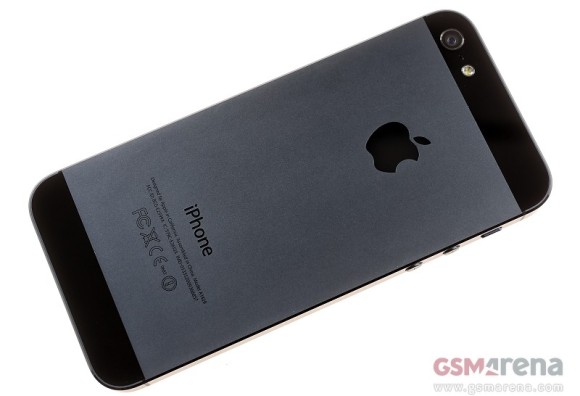
T-Mobile US just took a major step in becoming more competitive. The carrier announced that it will officially carry Apple products beginning in 2013.


The Big Magenta delivered the important news in a rather stealthy fashion. The announcement was part of Deutsche Telekom's financial plans through 2015. No specifics of the deal between Apple and the US carrier were mentioned.

We can reasonably expect that the first Apple product to be officially available for T-Mobile will be the next generation iPhone. Its launch will likely coincide with the carrier's LTE network rollout next year.

Source | Via


Source : http://www.gsmarena.com/tmobile_us_will_officially_carry_apple_products_in_2013_-news-5170.php

BitTorrent’s Android apps reach 10 million download milestone

BitTorrent Remote App

BitTorrent has announced its collection of Android mobile applications have been downloaded 10 million times, with its uTorrent and Remote apps making up a large portion of that figure.

Keen BitTorrent users have really embraced the company’s Android applications, as they have been downloaded 10 million times since they first started to appear in November last year.

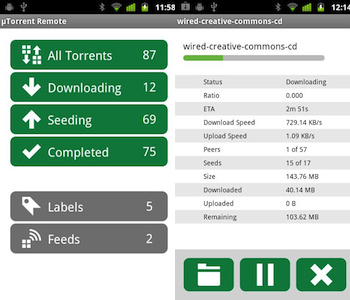
BitTorrent offers four official apps through Google Play: uTorrent Beta, BitTorrent Beta, and a remote app for both. The remote apps provide the opportunity to remotely control your BitTorrent or uTorrent client on your desktop machine or server. All the information you could want is there – from file sizes to seeding numbers – and torrents can even be activated from the app too.

The 10 million download figure is broken down like this: The BitTorrent Remote apps have been downloaded 4.7 million times, while the BitTorrent client app has racked up 1.5 million downloads. Finally, the uTorrent Beta app, which was released in September, has a download total of 3.8 million already on the books.

According to BitTorrent’s figures, 75 percent of its uTorrent users have no problem recommending it to others, 45 percent claim to use it a couple of times per week, and a truly dedicated 25 percent use the app each day.

While BitTorrent says its apps are available across all major platforms – iOS, Windows Phone and Android – this isn’t strictly true, as it’s only Google Play and the Windows Phone Store which have let in its dedicated mobile apps, while iOS users must make do with accessing the remote platform through a browser. BitTorrent released uTorrent and BitTorrent Remote apps for Windows Phone in October, both of which are still available in the store and are compatible with Windows Phone 7.5 and Windows Phone 8.

Apple on the other hand, has had a long-standing ban on apps related to BitTorrent in its App Store, and although some have been accidentally approved in the past, they’ve quickly been removed. The party line is “this category of applications is often used for the purpose of infringing third-party rights.”


Source : http://www.digitaltrends.com/mobile/bittorrents-android-apps-reach-10-million-download-milestone/